--- title: "Overview" slug: "overview-api-configuration-prelude" tags: ["API Configuration", "Dynamic URL", "Authentication Credentials"] updated: 2025-02-20T05:28:17Z published: 2025-12-17T09:27:42Z canonical: "help.symphonysummitai.com/overview-api-configuration-prelude" --- > ## Documentation Index > Fetch the complete documentation index at: https://help.symphonysummitai.com/llms.txt > Use this file to discover all available pages before exploring further. # Overview API (Application Programming Interface) Configuration is the process of configuring the parameters and settings necessary for an API to operate properly. This include setting up data formats (such JSON or XML), defining authentication credentials, creating endpoint URLs, and configuring different API behavior choices. Note The API Configuration that is set up in the current screen is widely utilized across various modules within our system. This includes, but is not limited to, the following: - **Azure User Import**: The integration with Microsoft Azure to import user details relies on the API settings for secure and accurate data retrieval. - **OKTA AD Import**: Similarly, the API Configuration is key for connecting with Okta's Active Directory to import user information in a consistent and reliable manner. - **BRD**: Business Rule Designer (BRD) module leverages the API Configuration for various operations. - **Scheduler**: The Scheduler module uses the API settings for tasks that involve interfacing with external services to trigger events or actions at specified times. - **SMTP**: Simple Mail Transfer Protocol (SMTP) settings for sending out emails are dependent on the API Configuration to ensure emails are delivered securely and efficiently. - **SMS**: For sending text messages, the SMS module relies heavily on the API Configuration to connect with telecommunication service providers. - **Mailbox**: The Mailbox module also uses the API Configuration to interact with email services, managing incoming and outgoing communications effectively. It is crucial to recognize that any changes to the API Configuration could potentially impact all the above modules and their related functionalities. Therefore, extreme caution should be exercised when making modifications to the API settings to avoid any disruptions in service and ensure continuous and seamless operation across the system. API Configuration can be enabled by **GET**, **POST** and **PUT** methods. - **GET** method is used to retrieve or get information from a given server using the specified URL. - **POST** method is used to send data to a server. It is also used for inserting new items to the backend server. - **PUT** method is used to update an existing resource. ![](https://cdn.document360.io/62351b42-cfbd-43ad-8ce1-82b8f455337f/Images/Documentation/GET.png?sv=2026-02-06&spr=https&st=2026-11-08T16%3A15%3A58Z&se=2026-11-08T17%3A15%3A58Z&sr=c&sp=r&sig=KIKxEXcVsKnrAQGh%2BE3kEAv2FOTU1O1k0SuDv0lvWRQ%3D) Figure: API Configuration Let's explore the following use-case. | **Use Case** **User Persona: Application Designer** | **Solution** | | --- | --- | | NovaTech is faced with a scenario where they need to get data from an outside server, send data to an outside server, or update an existing resource. | To achieve this, Sam enables the API Configuration to interface with other applications and devices. The API Configuration is invoked successfully to intermediate between the system server and outside servers. | ### Configure API Effective API configuration is crucial for smooth communication between different software systems, ensuring that data is exchanged accurately and securely. To configure API, perform the following steps.

1. Navigate to Design Studio > Module > Designers > API Configuration.
2. Select the **Domain** and **Sub Domain** from the drop-down menu. The list of configured API is displayed based on Tenants. To learn more on how to manage the list page, navigate to [Manage API Configuration](https://help.symphonysummitai.com/summit-platform/docs/manage-api-configuration). ![](https://cdn.document360.io/62351b42-cfbd-43ad-8ce1-82b8f455337f/Images/Documentation/image-1711350261907.png?sv=2026-02-06&spr=https&st=2026-11-08T16%3A15%3A58Z&se=2026-11-08T17%3A15%3A58Z&sr=c&sp=r&sig=KIKxEXcVsKnrAQGh%2BE3kEAv2FOTU1O1k0SuDv0lvWRQ%3D) Figure: API Configuration List page 3. Click **New** to add API Configuration. ![](https://cdn.document360.io/62351b42-cfbd-43ad-8ce1-82b8f455337f/Images/Documentation/image-1711350344380.png?sv=2026-02-06&spr=https&st=2026-11-08T16%3A15%3A58Z&se=2026-11-08T17%3A15%3A58Z&sr=c&sp=r&sig=KIKxEXcVsKnrAQGh%2BE3kEAv2FOTU1O1k0SuDv0lvWRQ%3D) Figure: Add API Configuration ### API Configuration Details API configuration can be achieved by setting up the following fields. For more information, refer to the table below. ![](https://cdn.document360.io/62351b42-cfbd-43ad-8ce1-82b8f455337f/Images/Documentation/image-1711350461922.png?sv=2026-02-06&spr=https&st=2026-11-08T16%3A15%3A58Z&se=2026-11-08T17%3A15%3A58Z&sr=c&sp=r&sig=KIKxEXcVsKnrAQGh%2BE3kEAv2FOTU1O1k0SuDv0lvWRQ%3D) Figure: API Configuration Details. The **API Configuration Details** section displays the following fields that need to be defined. | Field | Description | | --- | --- | | API Config Name* | Specify a unique and identifiable name for the API. | | API Group Name* | Choose a group name from the drop-down menu to group similar API being configured. For example, Internal API, OKTA Active Directory, Others etc. **Microsoft Teams** - Microsoft provides the Microsoft Graph API, which allows developers to access Teams-related data, such as messages, meetings, and user information. **Internal API** - An **Internal API** is an API that is used within an organization for internal systems and applications. They help in integrating internal services, automating workflows, and enhancing data exchange between different internal applications. **Microsoft Entra ID** - Microsoft provides Microsoft Entra ID APIs via Microsoft Graph for user management, authentication, role-based access control (RBAC), and Single Sign-On (SSO). **OKTA Active Directory** - OKTA APIs allow developers to manage users, authentication flows, and application access. **Others** - Third Party Authentication Services | | Configured For / API Type* | Select the type from the drop-down menu. Example: SMTP Gateway, Teams, Mailbox, Webhooks. **SMTP Gateway** - Setting up an API to send emails using an SMTP server. **SMS Gateway** - Allowing sending SMS messages via an API **Inbound** - Processing incoming API requests from external clients. **Outbound** - Sending data from an internal system to an external CRM or database. **MS Teams** - Integration of an API with Microsoft Teams to send and receive messages, manage channels, and automate workflows **Slack** - Slack API configuration allows sending messages, managing users, and integrating workflows. **Mailbox** - API configuration for a Mailbox means integrating with an email system (e.g., Outlook, Gmail) to send and receive emails. **Webhooks Gateway** - Webhooks allow applications to **push data** when an event occurs. | | Domain* | Domain is the highest level of hierarchy. It is the main identity of a parent company with different subsidiaries. | | Sub Domain* | A Sub Domain is the second level of hierarchy. It is chosen as a drop-down menu based on Domain selection. | | Department* | Choose the Tenant from the drop-down menu. It is a unit in an organization that provides support to different functions. Example: IT, Facilities etc. | | Active | Enable the Active Switch while configuring a new API. | | Icon | Choose an icon to be uploaded for the specified API. The maximum upload file size is 1MB Image dimensions should not exceed 50px X 50px Supported imag formats are .gif, .jpeg, .jpg, .png, .bmp. The images will display as shown below while using the Call API functionality. ![](https://cdn.document360.io/62351b42-cfbd-43ad-8ce1-82b8f455337f/Images/Documentation/image-1715066146392.png?sv=2026-02-06&spr=https&st=2026-11-08T16%3A15%3A58Z&se=2026-11-08T17%3A15%3A58Z&sr=c&sp=r&sig=KIKxEXcVsKnrAQGh%2BE3kEAv2FOTU1O1k0SuDv0lvWRQ%3D) |

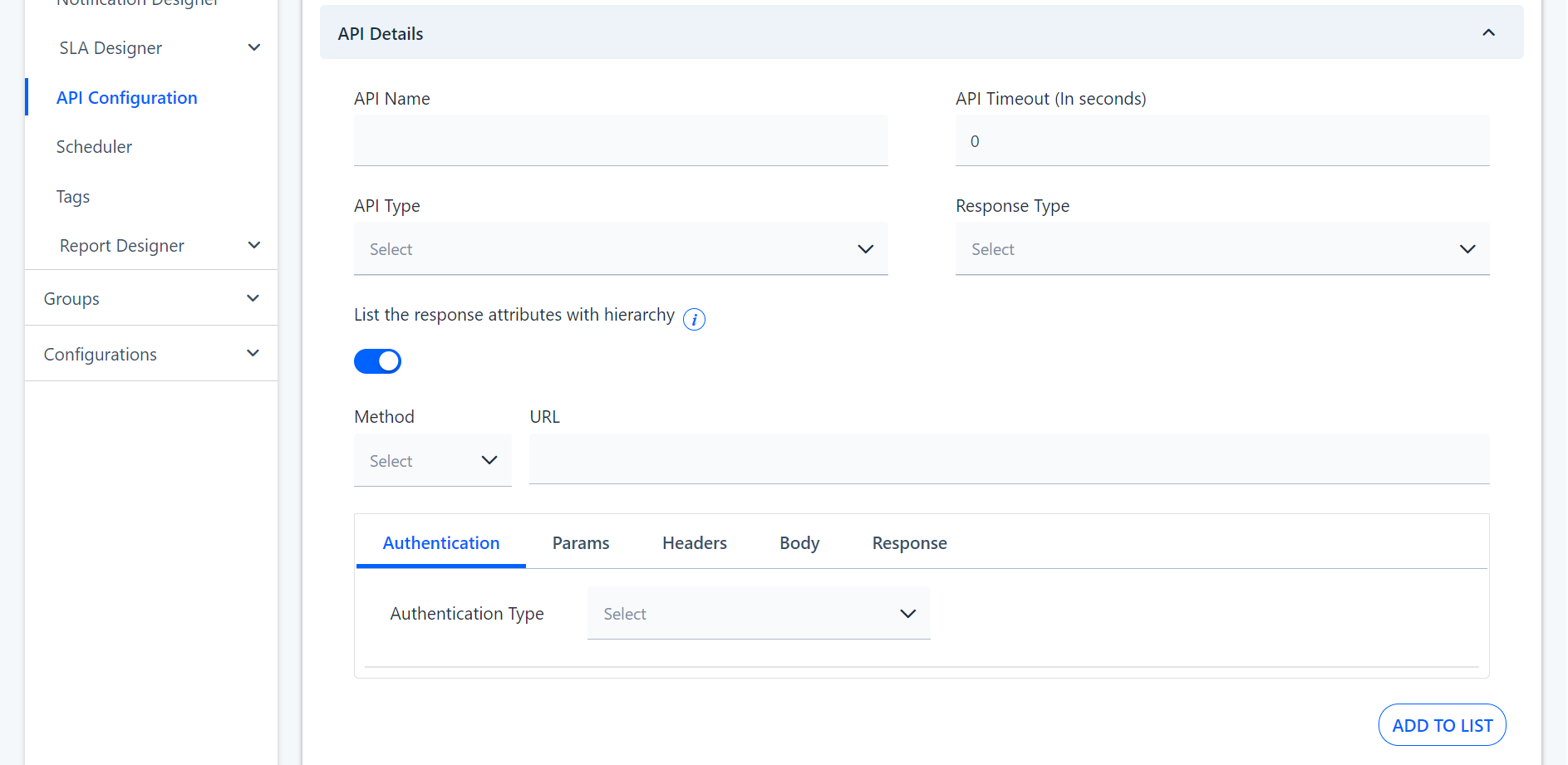
API Details

Figure: API Details page The API Details section lists the following field that needs to be defined. For more information, refer to the table below.
 

Field

Description

API Name

Specify a unique name for the API.

API Timeout (In seconds)

Choose a numeral for specifying the timeout (In seconds)

API Type

Choose the API from the drop-down menu. For example, Internal or External.
External - An External API is accessible to users, developers, or third-party organizations outside of the company.
Internal - An Internal API is designed for use within an organization. It is not exposed to external users or developers.

Response Type

Specify the Response Type as Array or Object.
Array - An Array in an API response contains a list of multiple objects, enclosed in [] (square brackets). Each item in the array follows the same structure.
Object - An Object in an API response refers to a single structured data entity enclosed in {} (curly braces). It consists of key-value pairs where each key represents a specific field.

Method

Specify the method available to be configured for the API from the drop-down menu. Example: Get, Post, Put etc.
Get - Retrieve data from the server.
Post - Send new data to the server.
Put - Update existing data on the server.

URL

Specify a validated URL.

Add to List

Choose the button to add the configured parameters to the list.

Authentication ParamsHeaderBodyResponse | **Authentication** | | | --- | --- | | Authentication Type | Choose the predefined values from the drop-down list. Example: No Authentication, API Key, Bearer Token, Basic, OAuth 2.0. | | URL | Enter the URL details for the API. | | Authentication Types | No Authentication ![](https://cdn.document360.io/62351b42-cfbd-43ad-8ce1-82b8f455337f/Images/Documentation/No%20Authentication.png?sv=2026-02-06&spr=https&st=2026-11-08T16%3A15%3A58Z&se=2026-11-08T17%3A15%3A58Z&sr=c&sp=r&sig=KIKxEXcVsKnrAQGh%2BE3kEAv2FOTU1O1k0SuDv0lvWRQ%3D) | | | API Key - In API configuration, API Key & Value authentication is a method of securing access to an API by requiring clients to provide a unique key-value pair. The API provider usually provides this key and acts as a form of credential to verify and authorize requests. ![](https://cdn.document360.io/62351b42-cfbd-43ad-8ce1-82b8f455337f/Images/Documentation/API%20Key.png?sv=2026-02-06&spr=https&st=2026-11-08T16%3A15%3A58Z&se=2026-11-08T17%3A15%3A58Z&sr=c&sp=r&sig=KIKxEXcVsKnrAQGh%2BE3kEAv2FOTU1O1k0SuDv0lvWRQ%3D) | | | Bearer Token - A Bearer Token is a security token used in authentication and authorization to access protected resources in an API. It follows the OAuth 2.0 authentication framework and is called a "bearer" token because the user (or system) presenting the token is assumed to be authenticated without needing further proof. ![](https://cdn.document360.io/62351b42-cfbd-43ad-8ce1-82b8f455337f/Images/Documentation/Bearer%20Token.png?sv=2026-02-06&spr=https&st=2026-11-08T16%3A15%3A58Z&se=2026-11-08T17%3A15%3A58Z&sr=c&sp=r&sig=KIKxEXcVsKnrAQGh%2BE3kEAv2FOTU1O1k0SuDv0lvWRQ%3D) | | | Basic - Basic Authentication is a simple and widely used method for securing APIs. It involves sending a username and password in the request header, which the server validates before granting access. ![](https://cdn.document360.io/62351b42-cfbd-43ad-8ce1-82b8f455337f/Images/Documentation/Basic.png?sv=2026-02-06&spr=https&st=2026-11-08T16%3A15%3A58Z&se=2026-11-08T17%3A15%3A58Z&sr=c&sp=r&sig=KIKxEXcVsKnrAQGh%2BE3kEAv2FOTU1O1k0SuDv0lvWRQ%3D) | | | OAuth 2.0 - OAuth (Open Authorization) is an authentication and authorization framework that allows applications to securely access resources on behalf of a user without exposing their credentials. It is commonly used for third-party API access, such as logging in with Google, Facebook, or GitHub. ![](https://cdn.document360.io/62351b42-cfbd-43ad-8ce1-82b8f455337f/Images/Documentation/image-1739961243477.png?sv=2026-02-06&spr=https&st=2026-11-08T16%3A15%3A58Z&se=2026-11-08T17%3A15%3A58Z&sr=c&sp=r&sig=KIKxEXcVsKnrAQGh%2BE3kEAv2FOTU1O1k0SuDv0lvWRQ%3D) **Grant Type** - The grant type defines how the client application obtains an access token. Common grant types include. Select the Grant Type as Password Credentials or Client Credentials. **Token URL** - The Token URL is the endpoint where the client application sends authentication requests to obtain an access token. **Client ID** - The **Client ID** is a unique identifier assigned to the client application by the API provider. **Client Secret** - The Client Secret is a confidential key assigned to the client application, used along with the Client ID to authenticate requests. **UserName** - Used in Password Grant Type, where the user directly provides their credentials to obtain an access token. **Password** - Used in Password Grant Type, where the user directly provides their credentials to obtain an access token. **Confirm Password** - Confirm the password entered above. **Scope** - The Scope specifies the level of access granted to the client. It defines what the client can do with the API (e.g., read-only, write access, or admin privileges). | | **Params** | ![](https://cdn.document360.io/62351b42-cfbd-43ad-8ce1-82b8f455337f/Images/Documentation/image-1739961167095.png?sv=2026-02-06&spr=https&st=2026-11-08T16%3A15%3A58Z&se=2026-11-08T17%3A15%3A58Z&sr=c&sp=r&sig=KIKxEXcVsKnrAQGh%2BE3kEAv2FOTU1O1k0SuDv0lvWRQ%3D) | | --- | --- | | Key | Specify a name for the Key. | | Value Type | Choose the Value Type from the drop-down list. For example, Static or API | | API | Choose the selected name for the API. | | API Element | Specify the API Element from the drop-down list provided. | | Value | Select the value field which gets enabled only when the Value Type is chosen as Static. | | Description | Choose a brief description about the parameter. | | Action | Choose the Action button if the configurations need to be deleted. | | **Header** | ![](https://cdn.document360.io/62351b42-cfbd-43ad-8ce1-82b8f455337f/Images/Documentation/image-1739961326529.png?sv=2026-02-06&spr=https&st=2026-11-08T16%3A15%3A58Z&se=2026-11-08T17%3A15%3A58Z&sr=c&sp=r&sig=KIKxEXcVsKnrAQGh%2BE3kEAv2FOTU1O1k0SuDv0lvWRQ%3D) | | --- | --- | | Key | Specify a name for the Key | | Value Type | Choose from the drop-down list to specify the Value Type. Example: Static or API. | | API | Choose the selected name for the API. | | API Element | Specify the API Element from the drop-down menu. | | Value | Specify the value. This field gets enabled when the Value Type is set to Static. | | Description | Give a brief description of the Headers. | | Action | Choose the Action button if the configurations need to be deleted. | | **Body** | ![](https://cdn.document360.io/62351b42-cfbd-43ad-8ce1-82b8f455337f/Images/Documentation/image-1739961376965.png?sv=2026-02-06&spr=https&st=2026-11-08T16%3A15%3A58Z&se=2026-11-08T17%3A15%3A58Z&sr=c&sp=r&sig=KIKxEXcVsKnrAQGh%2BE3kEAv2FOTU1O1k0SuDv0lvWRQ%3D) | | --- | --- | | Request Type | Specify the format of the Body form the drop-down menu. For example, Text, JSON, XML. | | **Response** | ![](https://cdn.document360.io/62351b42-cfbd-43ad-8ce1-82b8f455337f/Images/Documentation/image-1739961419266.png?sv=2026-02-06&spr=https&st=2026-11-08T16%3A15%3A58Z&se=2026-11-08T17%3A15%3A58Z&sr=c&sp=r&sig=KIKxEXcVsKnrAQGh%2BE3kEAv2FOTU1O1k0SuDv0lvWRQ%3D) | | --- | --- | | Description | Specify the format of Response from the drop-down menu. For example, Text or JSON. | The last section Configured API displays the list of Configured API with the following details. ![](https://cdn.document360.io/62351b42-cfbd-43ad-8ce1-82b8f455337f/Images/Documentation/Configured%20API.png?sv=2026-02-06&spr=https&st=2026-11-08T16%3A15%3A58Z&se=2026-11-08T17%3A15%3A58Z&sr=c&sp=r&sig=KIKxEXcVsKnrAQGh%2BE3kEAv2FOTU1O1k0SuDv0lvWRQ%3D) Figure: Configured API
 

Field

Description

Action

Choose the icons for Actions related to the API. For example, Edit or Delete.

API Name

The name specified while creating the API is displayed here. For example, Get User ID, Post Message, Create Calendar.

API URL

The URL to update the action is specified here.

API Method

The API method that has been specified is displayed. For example, GET, POST, PUT etc.

Authentication Name

The Authentication name that has been specified is displayed. For example, OAuth.

Status

The status is displayed as Active or Inactive.
The standard HTTP status codes are displayed to indicate whether the API request has been executed successfully or not. The following are the standard response codes:

  • Successful Responses (200-299)

  • Client Errors (400-499)

  • Server Errors (500 - 599)

### Dynamic URL A Dynamic URL for API Configuration is a URL that is generated or modified dynamically based on certain parameters, making it adaptable to different environments or user needs. This is particularly useful in API integration scenarios where the URL changes depending on the environment (development, testing, or production) or user-specific data. #### Configure API 1. Navigate to **Design Studio** > **Module** > **API Configuration**. 2. Click **New**. 3. Enter all the mandatory information in the **API Configuration Details**. 4. Navigate to **API Details** and enter all the required information. 5. Enter details in the URL as below. The **ID** is configured in the **Params** as a **Dynamic Value Type**. ![](https://cdn.document360.io/62351b42-cfbd-43ad-8ce1-82b8f455337f/Images/Documentation/image-1739428349785.png?sv=2026-02-06&spr=https&st=2026-11-08T16%3A15%3A58Z&se=2026-11-08T17%3A15%3A58Z&sr=c&sp=r&sig=KIKxEXcVsKnrAQGh%2BE3kEAv2FOTU1O1k0SuDv0lvWRQ%3D) Figure: Dynamic URL Note The value provided in the **URL** and the **Params Key** should be the same for the **Dynamic URL**. 6. Click **Send**. The Response can be viewed as below. ![](https://cdn.document360.io/62351b42-cfbd-43ad-8ce1-82b8f455337f/Images/Documentation/image-1735796393695.png?sv=2026-02-06&spr=https&st=2026-11-08T16%3A15%3A58Z&se=2026-11-08T17%3A15%3A58Z&sr=c&sp=r&sig=KIKxEXcVsKnrAQGh%2BE3kEAv2FOTU1O1k0SuDv0lvWRQ%3D) Figure: Response 7. Click **Save**. 8. The **Call API** function in the **Scheduler** and **Business Rule Designer** can be configured to run the API. For more information refer to [**Scheduler**](https://help.symphonysummitai.com/summit-platform/docs/clone-call-api-1-schedulermodule-prelude) & [**Business Rule Designer**](https://help.symphonysummitai.com/summit-platform/docs/call-api-prelude). ![](https://cdn.document360.io/62351b42-cfbd-43ad-8ce1-82b8f455337f/Images/Glossary/sam(2).jpg?sv=2026-02-06&spr=https&st=2026-11-08T16%3A15%3A58Z&se=2026-11-08T17%3A15%3A58Z&sr=c&sp=r&sig=KIKxEXcVsKnrAQGh%2BE3kEAv2FOTU1O1k0SuDv0lvWRQ%3D) Primary entity in the platform topology which is required to create other components. Sub Domains are subsidiaries under Domains that are used to design the next level of platform components to function independently as required by business units. Tenant is a platform component that is created inside the Sub Domain to leverage the independent functionality of a department along with data privacy.