Analysts often spend valuable time reviewing individual incidents to determine which issues require immediate attention and whether multiple incidents share a common cause. AIW - Smart Incident Intelligence feature, eliminates this manual effort by allowing Analysts to natural language prompts or slash commands to receive AI-powered incident prioritization, root cause insights, and historical solution recommendations.
As, AIW supports both natural language prompts and slash commands, allowing Analysts to choose the interaction style that best fits their workflow.
Examples
Natural language
Sample Query: “I have 10 tickets in my bucket. Which one should I work first?”Slash command
/plan-my-day
Both produce the same AI-powered insights.
By highlighting related incidents and prioritizing high-impact issues, AIW helps Analysts investigate less, act faster, and resolve more incidents with confidence.
Use Case
Scenario: Application Login Failure
An Analyst begins the day with multiple assigned incidents and needs to quickly identify which issues require immediate attention and whether any incidents are related.
User Action
The Analyst asks:
I have 10 tickets in my bucket. Which one should I work first?
or enters the following slash commands:
/plan-my-day
AIW Response
AIW analyzes the analyst's assigned incidents and provides AI-powered insights, such as:
Groups similar incidents into meaningful categories.
Highlights the number of incidents in each category.
Suggests probable root causes for identified incident clusters.
Recommends historical resolutions and proven solution patterns.
Prioritizes incident clusters based on their potential impact.
Outcome
Analysts can instantly understand their workload, identify high-impact incident clusters, and access AI-generated root cause and solution recommendations without manually reviewing each ticket. By resolving the underlying issue first, they can potentially address multiple related incidents in a single investigation, reducing resolution time and improving overall productivity.
This eliminates the need to manually review and analyze each assigned incident individually, enabling analysts to prioritize high-impact issues and resolve incidents faster.
Smart Incident Intelligence Functionality
Log in to the Application as an Analyst.
Click on the AIW Chat icon.
The AIW chat window is displayed. Enter either a natural language prompt or a slash command to retrieve the same AI-powered insights.
.png?sv=2026-02-06&spr=https&st=2026-11-07T16%3A02%3A04Z&se=2026-11-07T16%3A15%3A04Z&sr=c&sp=r&sig=u9tj0ObhFGr4FahafxXkIBsYAlO0bhrlgpVHuIN39Bo%3D)
Figure: NLP Prompt
Slash Prompt can also be used to get the AIW Response. Click / to get the slash prompt “/plan-my-day”.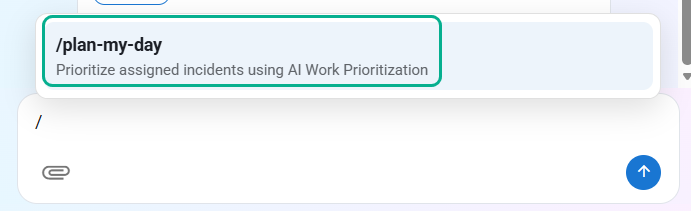
Figure: Slash Prompt
Analyst gets the same AIW response with prompt as well.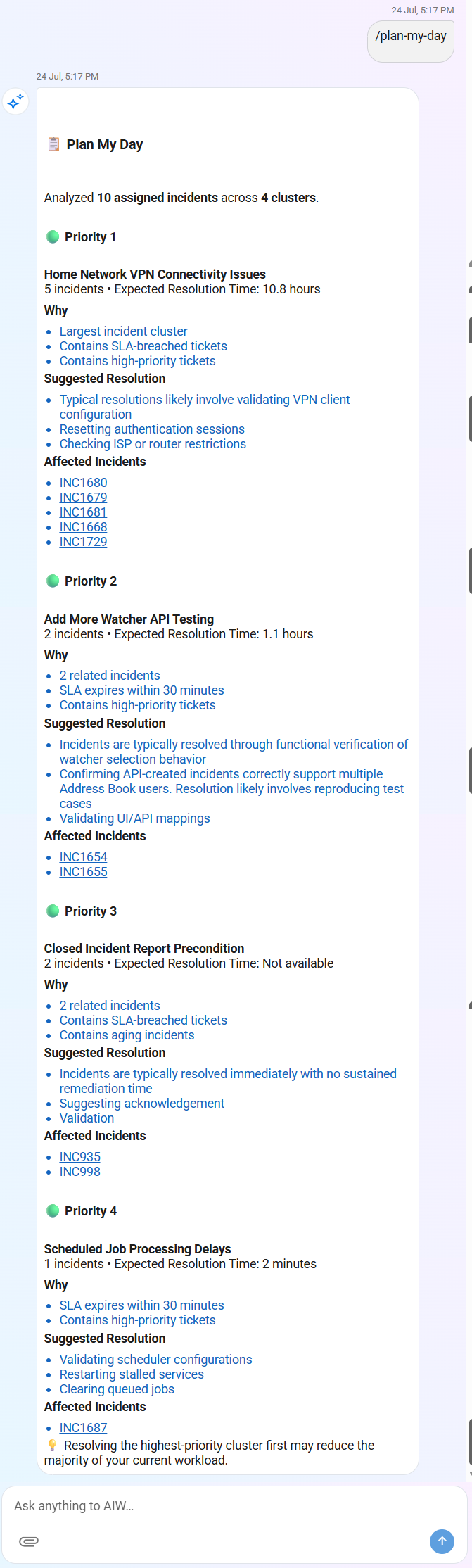
Figure: AIW Response - Slash Prompt
Note
Slash Prompt remains static ‘/plan-my-day’, however, NLP prompt can be any query from the Analyst such as “Could you please help me plan my day?” or “Prioritize my incidents”.
When an Analyst invokes the /plan-my-day command (or an equivalent natural language prompt), AIW analyzes up to 10 assigned incidents and organizes them into priority-based incident clusters.
Each cluster represents a group of related incidents and is ranked based on factors such as the number of affected incidents, SLA status, ticket priority, and expected resolution effort.
Each priority cluster includes the following information:
UI Element | Description |
|---|---|
Priority | Indicates the recommended order in which the incident clusters should be addressed. Priority is determined based on factors such as incident volume, SLA status, ticket priority, and expected resolution effort. |
Cluster Name | Displays the common issue or incident category represented by the cluster (for example, Home Network VPN Connectivity Issues). |
Incident Count | Shows the number of related incidents contained within the cluster. |
Expected Resolution Time | Displays the estimated time required to resolve the cluster, when available. |
Why | Explains why AIW assigned the cluster its current priority. Reasons may include the largest incident cluster, SLA-breached incidents, aging incidents, or high-priority tickets. |
Suggested Resolution | Provides AI-generated recommendations based on historical incident resolution patterns and similar incidents. These suggestions are intended to assist analysts during investigation. |
Affected Incidents | Lists the incidents that belong to the selected cluster. Each Incident ID is displayed as a hyperlink, allowing analysts to open the incident directly from the AIW response. |
Note
AIW analyzes a maximum of 10 assigned incidents per request. The incident clusters displayed are generated based on the Analyst's current assigned workload.
While the cluster names remain consistent for similar issue patterns, the number of incidents within each cluster and their priority order may vary for each Analyst depending on their assigned incidents.
Best Practice
Begin your day with the /plan-my-day command to obtain an AI-prioritized view of your assigned incidents. Address the highest-priority cluster first to maximize the number of incidents resolved with a single investigation and reduce the overall workload more efficiently.