The Classify Text node analyzes the input text and classifies it into a predefined category. The classification result can be used by subsequent activities in the integration flow to determine the appropriate processing path
Benefits
Automatically categorizes incoming text.
Reduces manual decision-making in integration flows.
Makes the classification result available for downstream processing.
Supports intelligent routing based on the classified output.
Configure Classify Text
Configure the Classify Text node to classify incoming text and use the result in the integration flow.
To configure Decision node, perform the following steps:
Click
 (Add Step) and navigate to AI > Classify Text.
The Classify Text node is displayed.
Figure: Classify TextClick Classify Text node to view the Classify Text Parameters.
The Classify Text parameters are displayed.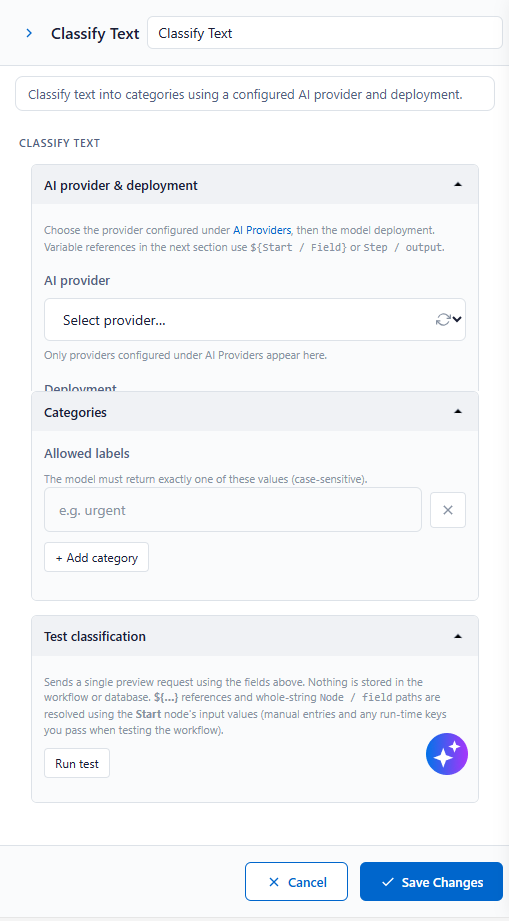
Figure: Classify Text - ParametersEnter the required details in the following sections and click Save Changes.
AI provider & deployment
Text to classify
Categories
Test classification
AI provider & deployment
An AI provider & deployment defines the connection to an external AI service that is used by AI components in integration flows. Select the configured AI provider and model deployment. Then, use
${Start / Field}orStep / Outputto reference variables in the following section.
Text to classify
Enter the text that you want the AI model to analyze and classify. You can enter plain text or use variables from previous steps in the integration flow.
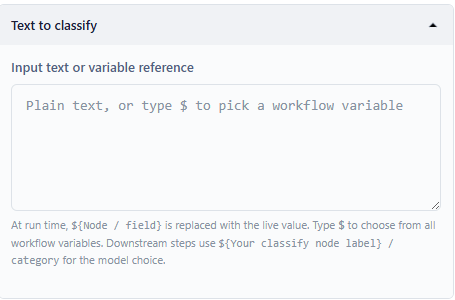
Specifies the text that the AI model analyzes and classifies. Enter static text or reference variables using
${Start / Field}orStep / Output.Categories
Configure one or more categories that the AI model can use to classify the input text. The classification result is selected from the configured categories.
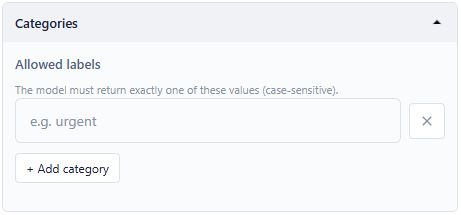
Click + Add category to specify the list of labels that the AI model can assign to the input text. You can remove the added category by clicking
 .
. Text classification
Use the Test Classification option to validate the configured model by submitting sample text and reviewing the predicted classification before using it in an integration flow.
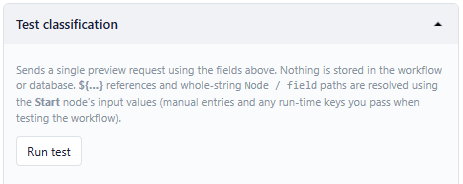
Click Run Test to execute the classification using the configured AI provider, model deployment, and allowed labels.