AIW now displays a persistent information banner that provides End Users and Analysts with quick access to important support information, such as Service Desk contact details, escalation paths, business hours, or organization-specific guidance.
The banner is always visible within the AIW panel—it remains fixed and does not scroll away with the conversation. It serves as a passive information display and does not affect the conversation flow or AIW's behavior.
AIW also displays a standard AI disclaimer that communicates AI usage, limitations, and compliance information.
AI Disclaimer = A standard notice about the responsible use and limitations of AI.
Example
“AIW is AI and it can make mistakes.”
Custom Banner = A configurable banner for organization-specific communication and announcements.
Example
“For any support, reach out to 1-800-2634 support number.”
Note
Administrators can configure the custom banner displayed to End Users and Analysts.
Use Case
Scenario: Organization Information Always at Hand
User Action
An End User or Analyst opens the AIW panel to interact with the AI assistant.
AIW Response
AIW displays a persistent information banner that remains visible throughout the session, providing organization-configured information such as:
Service Desk contact details
Business hours
Planned maintenance announcements
Internal escalation contacts
Organization guidelines or important notices
The banner stays fixed within the AIW panel, does not scroll with the conversation, and serves only as an informational element without affecting AIW responses or the conversation flow.
Outcome
Both End Users and Analysts have instant access to essential organization information while interacting with AIW. End Users can quickly find the appropriate contact or guidance when needed, while Analysts can refer to escalation details or operational information—all without leaving the AIW interface or interrupting their workflow.
This eliminates the need to switch between applications or search for important organizational information, enabling users to stay focused on their tasks.
Viewing Custom Banner and AI Disclaimer
Log in to the Application as an End User/Analyst.
Click on the AIW Chat icon.
The AIW chat window opens and displays the configured Custom Banner at the bottom of the chat interface (if enabled for the Tenant).
Refer to the sample screenshot below for an illustration of the Custom Banner displayed in AIW..png?sv=2026-02-06&spr=https&st=2026-11-07T16%3A22%3A05Z&se=2026-11-07T16%3A34%3A05Z&sr=c&sp=r&sig=jNdZ5ApP6TRLba%2B4gSixdxxWriVZz%2F%2Bg18GYnDyZGEc%3D)
Figure: Custom Information Banner
The Custom Banner reminds users that AIW responses may not always be accurate and advises them to contact the support team whenever additional assistance is required.
AI Disclaimer
End User can view only AI disclaimer if Custom Information Banner is not configured.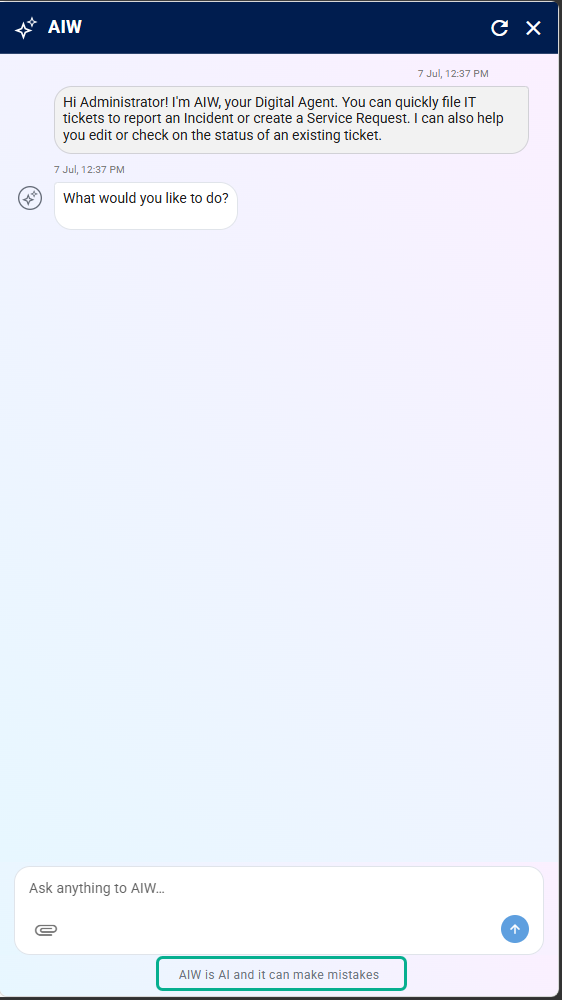
Figure: AI Disclaimer
End User can view both AI disclaimer and Custom Information Banner if both are configured.
Figure: AI Disclaimer and Custom Information BannerNote
The AI Disclaimer and Custom Banner are independently configurable. Based on the configured settings, users may see only the AI Disclaimer, only the Custom Banner, or both when accessing the AIW.