🎯 Now Live!Release Date | 21st July 2026
Let’s dive into the key highlights, exciting improvements introduced, and a few fixed issues to keep an eye on. Every update brings something new, with a focus on enhancing the experience!
The following section provides fixed issues in Apex Aspen Q2 Patch 3 release.
Improvements
Following are the improvements in this release.
Improvement Name | Description | Benefits |
|---|---|---|
Report Access and Configuration Enhancements User Persona: Administrator | The Reports module has been enhanced to improve security, accuracy, and usability. The following enhancements have been introduced:
For more information, refer to Report Access and Configuration Enhancements. |
|
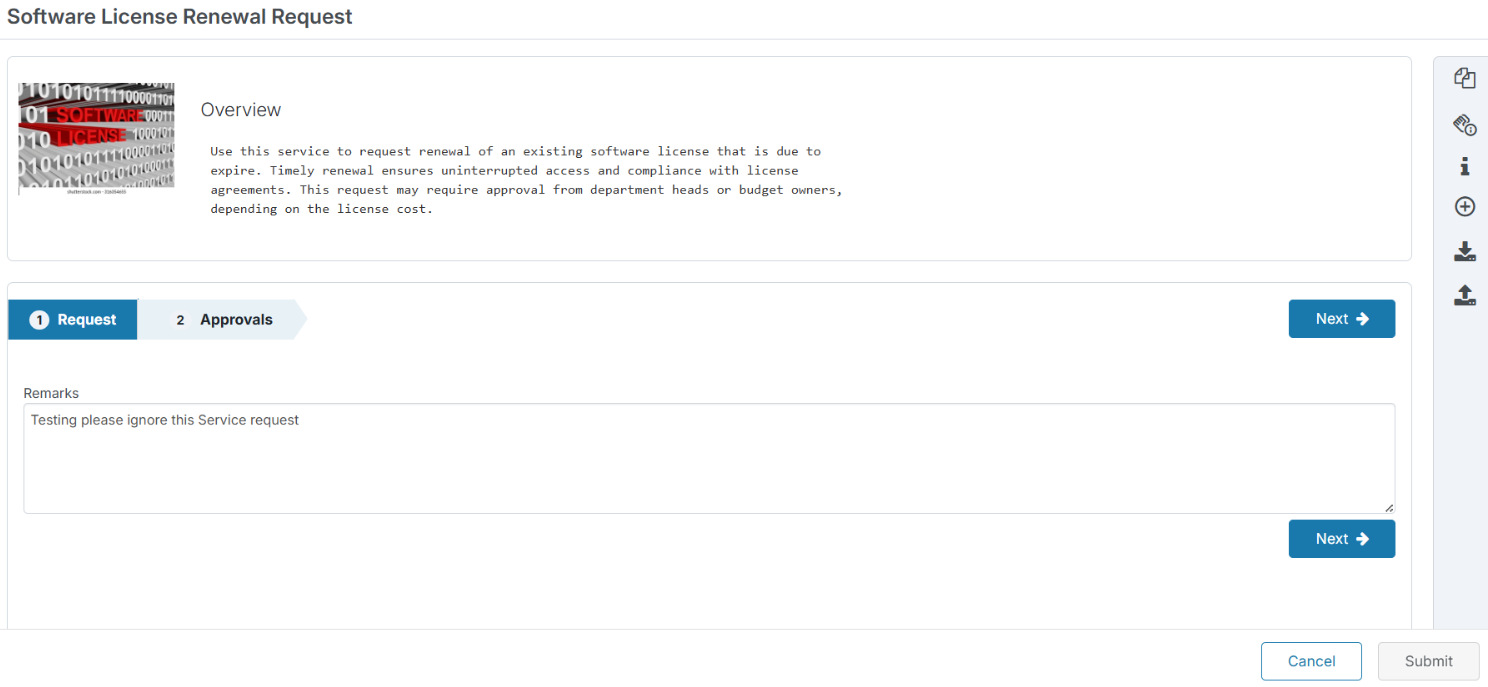
Service Request UI Enhancement (Submit and Cancel) User Persona: Administrator, Analyst, End User | Updated button order on the Service Request page – Reordered the action buttons to align with the latest UI guidelines by displaying Cancel before Submit. Improved layout spacing on the Service Request page – Optimized the page layout to automatically adjust the spacing between the catalog details and the Cancel/Submit buttons for catalogs with few or no attributes.
|
|
Fixed Issues
Following are the fixed issues in this release.
Issue ID | Issue Description | Resolution |
|---|---|---|
189672 | A validation message was displayed instead of identifying the specific mandatory field that required input during Service Request submission. | A validation message was displayed instead of identifying the specific mandatory field that required input during Service Request submission. |
189887 | Duplicate communication entries were displayed in the Communication section of Incident and Service Request records. | Communication entries are displayed correctly without duplication in Incident and Service Request records. |
117394 | In the New Service Request page, the label Sla Information was displayed in the right action menu on the Service Request page. The acronym SLA was incorrectly formatted, resulting in inconsistent capitalization and UI terminology. | The label text displays from Sla Information to SLA Information ensuring correct acronym capitalization and maintain UI consistency across the application. |
119637 | The organization logo height was inconsistent across the application when compared with the Summit logo, resulting in a UI alignment and branding inconsistency. | The organization logo height matches the Summit logo dimensions, ensuring consistent branding, visual alignment, and a uniform user experience across the application. |
119666 | The AIW icon placement and positioning were misaligned when the action panel was opened, resulting in an inconsistent UI layout and affecting the visual alignment of action panel elements. | The AIW icon placement and positioning when the action panel is opened is in proper alignment, consistent spacing, and a uniform user experience across the application. |
119607 | A duplicate template was displayed under User Communication under SR Details page. causing redundancy in the template selection list and potential confusion for users. | Each template is displayed only once and improving the user experience during template selection. |
189942 | In the User Profile page, an error was displayed when the user's name contained an apostrophe ('). The application did not properly handle special characters in usernames, resulting in processing error. | User Profile functions properly handle usernames containing apostrophes (') and possessive forms ('s) correctly. Users with names having apostrophe can now access and update their profiles without errors. |
188845 | In the History tab, the Elapsed Time by Workgroup section did not display records in the correct order based on workgroup-wise SLA elapsed time. The SLA elapsed time entries were presented in an inconsistent sequence, making it difficult for users to accurately review workgroup performance and SLA progression. | Elapsed Time by Workgroup section in the History tab displays records in the correct order based on SLA elapsed time, ensuring accurate sequencing, improved readability, and better analysis of workgroup-wise SLA performance. |
117777 | In the New Asset Details Report under Report > Asset Management > Charts > Tag Asset Management, an error message, "Error: Sorry, an error occurred," was displayed when users accessed the Samples tab, preventing the sample data from being loaded successfully. | In the Samples tab of the New Asset Details Report the sample data is loaded correctly for newly added fixed assets. Users can now access and view the Samples tab without error message. |
188710 | Incident and Service Request records created through the Mail-to-Ticket functionality were not inserted into the integration table, preventing automatic integration with external systems. | Incident and Service Request records created through the Mail-to-Ticket functionality are inserted into the integration table and processed successfully by the configured integration workflow. |
119971 | The Alerts & Reports option disappeared from the header after it was opened and the user navigated to other pages, such as Dashboard, Charts, or Datasets. | The Alerts & Reports option remains visible in the header during navigation across all supported pages. |
188202 | In Notification Parser, the Troubleshooting functionality was not working as expected. | In Notification Parser, the Troubleshooting functionality is working as expected. |
189558 | When a user replaced an email attachment before sending the email, the incident history incorrectly displayed both the deleted and the final attachment as successfully added, even though only the final attachment was intended to be sent. | The incident history records only the attachments included in the final email and does not log the deleted attachments as successfully added. |
189936 | After asset deallocation was completed, the assets remained in the In Transit status instead of moving to the Store location. | After asset deallocation is completed, the assets move to the Store location instead of In Transit status. |