🎯 Now Live!Release Date | 7th August 2026
Let’s dive into the key highlights, exciting improvements introduced, and a few known issues to keep an eye on. Every update brings something new, with a focus on enhancing the experience!
The following section provides key highlights and known issues in Apex Aspen Q3 release.
Key Highlights
Our team’s been on the move, polishing the UI and adding smarter functionality to power up your daily grind. Curious about What’s New? Dive in and explore the latest highlights - they are too good to miss!
Role-Based Access Control (RBAC) Enhancement
User Persona: End User
Why settle for broad permissions when you can have precise access?
This enhancement introduces Environment Admin, Manager, and Member roles, replacing the legacy role model (Admin, Analyst, Operator) to deliver stronger security, clearer responsibilities, and more granular access control.
Improved Security
Users receive only the permissions required for their role.Better Governance
Administrative responsibilities are clearly separated from operational tasks.Simplified Access Management
Role assignment becomes more intuitive and easier to audit.Scalability
The role model better supports growing teams and complex environments.
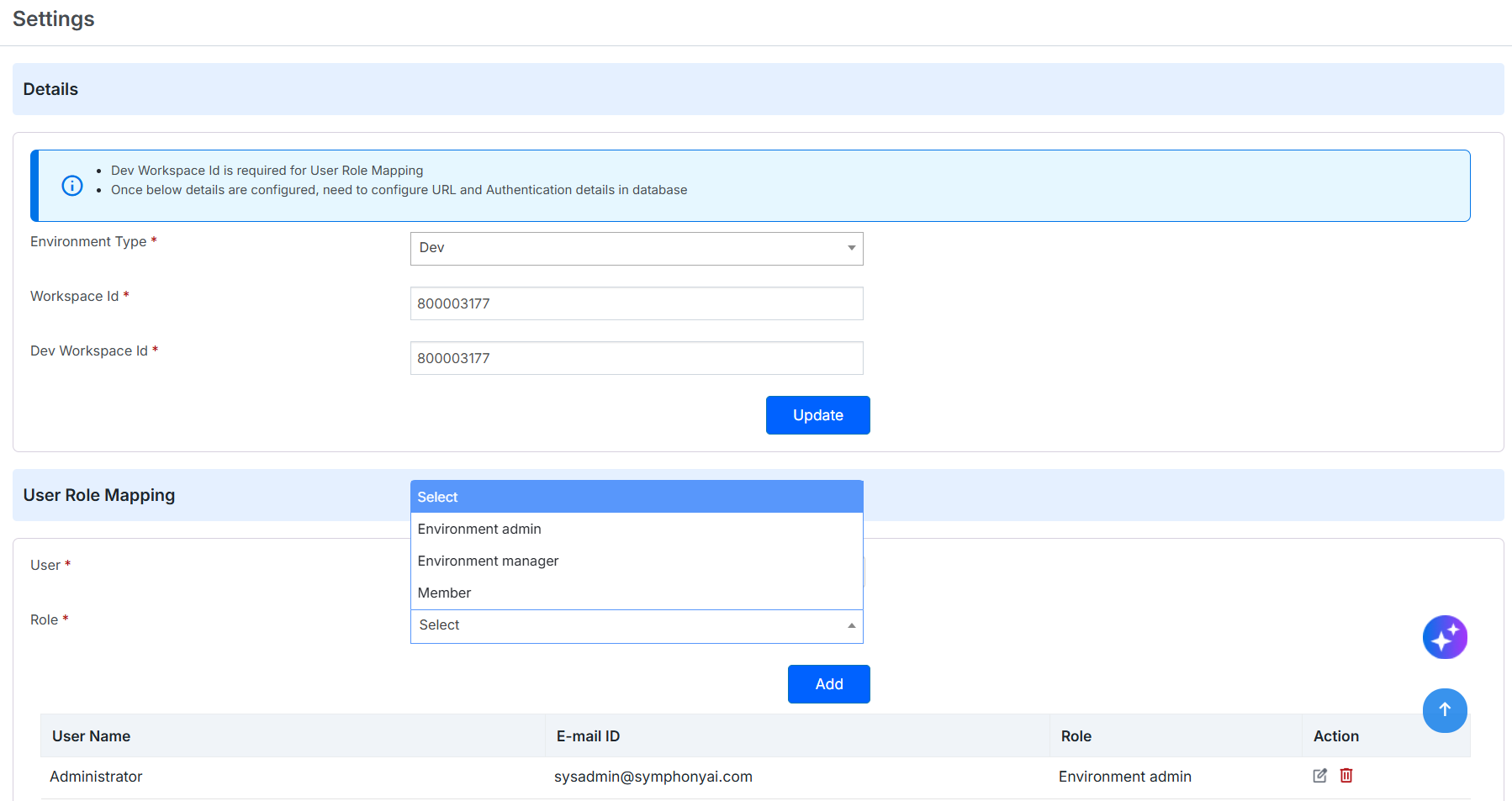
Figure: Integration Role Template - Settings
For more information, refer to Settings.
Landscape Intelligence
User Persona: CIO | IT Administrator | Service Delivery Manager
Struggling to Understand Your Incident Landscape at a Glance?
Gain actionable operational insights with Landscape Intelligence. Landscape Intelligence analyzes historical incident data to automatically identify recurring incident patterns, measure service desk performance, and highlight routing and ownership inconsistencies—all from a single dashboard.
✅ Perks at a glance
Context-aware
AIW understands what the user is working on by carrying relevant ticket context directly into the conversation, eliminating repetitive data entry and unnecessary navigation.Action-oriented
AIW goes beyond providing information—it helps users respond, create, update, escalate, and follow up on tickets directly from the dashboard.Conversational
Users can simply describe what they need in natural language, while AIW understands the intent and guides them through the appropriate action.
Record-connected
AIW doesn't stop at conversation—it connects actions back to the underlying ticket, keeping user interactions and tickets in sync.Dashboard-connected
The dashboard stays in sync with user actions, dynamically updating widgets and counts as tickets move through their workflows.Less navigation
AIW brings assistance and action directly into the dashboard, reducing screen switching and helping users complete common IT tasks with fewer steps. Figure: Landscape Intelligence Dashboard
Note
Landscape Intelligence is a Beta feature. It is available for early evaluation and may undergo changes or enhancements in future releases.
For more information, refer to Landscape Intelligence.
Integration Platform
User Persona: Administrator
Need a Faster and Simpler Way to Integrate Apex with External Applications
The Integration Platform provides a centralized environment to create, deploy, and manage integrations between Apex and external applications. Using reusable connections, prebuilt connectors, configurable integration flows, and AI-powered activities, administrators can automate data exchange, streamline business processes, and monitor integrations from a single interface.
✅ Perks at a glance
Reusable Connections – Configure secure, reusable connections to Apex and external applications for consistent and simplified integration management.
Prebuilt Application Connectors – Integrate with Apex, ServiceNow, HTTP services, and AI providers using ready-to-use connectors and activities.
Integration Flow Designer – Design and automate business processes using a visual workflow designer with configurable triggers, decisions, lookups, and actions.
AI-Powered Integration Activities – Configure AI providers and model deployments to enable intelligent capabilities, such as text classification, within integration flows.
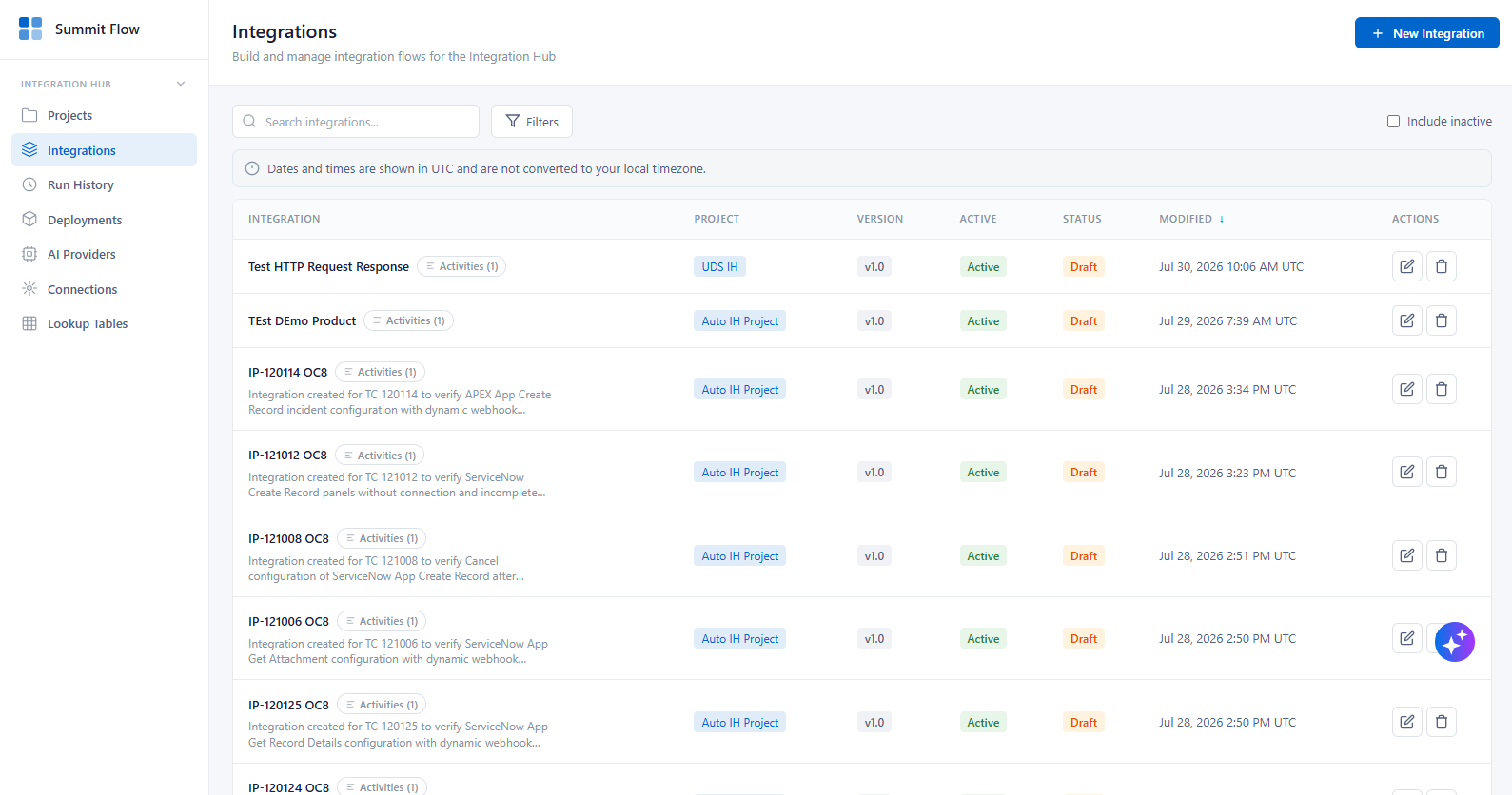
Figure: Integration Platform
For more information, refer to Integration Platform.
End User In-App AI Experience
User Persona: End User
Turn your ITSM dashboard into an intelligent workspace.
The User Dashboard has been enhanced with several capabilities that give users greater control over their dashboard data, improve visibility into pending actions, and provide faster access to frequently used tasks.
Department Selection: Enables users with access to multiple Departments to switch between an aggregated ALL view and individual Department views, ensuring that dashboard information is relevant to the selected scope.
Customizable User Dashboard Image: Allows Administrators to replace the system-provided default cover image with an organisation-specific image, such as a branded banner or corporate visual, to provide a more personalized dashboard experience.
Enhanced Bulletin Placement: Positions the existing Dashboard Bulletin at the top of the dashboard, making important organisation-wide announcements, such as planned maintenance, policy updates, and security directives, more prominent and easier to notice.
The End User Dashboard has been enhanced to provide a more consolidated and action-oriented experience, helping users stay informed of pending work, manage approvals, track assigned assets, monitor open requests, and access frequently used self-service actions from a single dashboard.
Response Needed
Escalate or Follow Up
Approvals and Refer Backs
My Accepted Assets
Asset Pending Acceptance
Asset Reconciliation
Split View for Open Incidents and Service Requests
Quick Actions Panel
✅ Perks at a glance
Personalized Dashboard
Displays only the tasks that require the current user's attention.AI-Assisted Actions
Provides AI-generated suggestions to help users respond faster and with greater confidence.
Action Without Navigation
Complete common ITSM tasks directly from the dashboard without opening individual tickets.
Faster Resolution
Reduces delays caused by pending approvals, unanswered queries, and referred-back tickets.
Improved Productivity
Keeps users focused on high-priority actions with contextual, real-time insights.
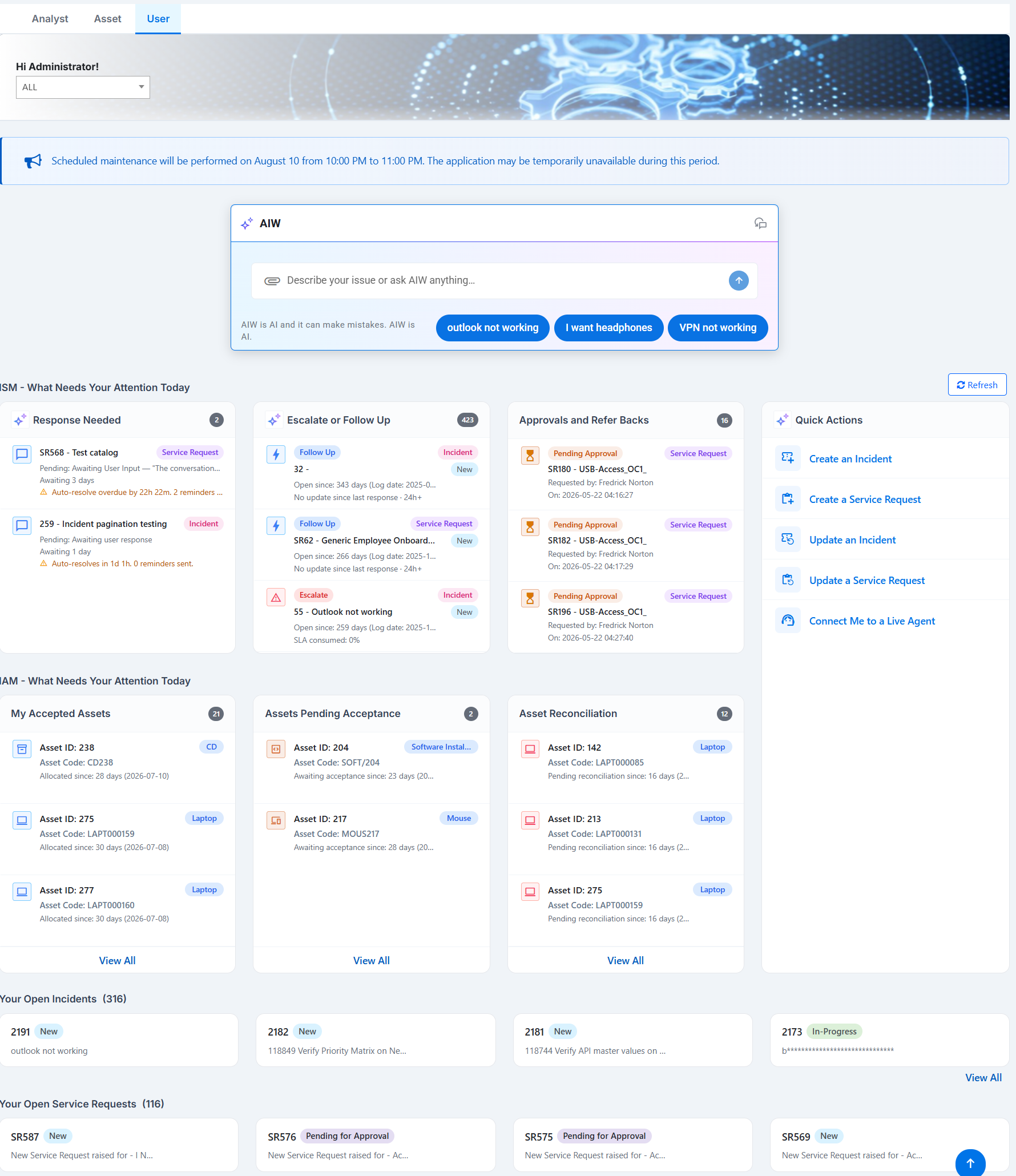
Figure: User Dashbaord
For more information, refer to User Dashboard.
Standard Change Template Enhancements
User Persona: Analyst
Why risk using outdated Standard Change Templates when you can proactively manage their lifecycle?
This enhancement introduces Expiry Date management for Standard Change Templates, enabling organizations to maintain an up-to-date template catalogue, improve governance, and ensure expired templates are identified and managed before they become a risk.
✅ Perks at a glance
Improved Template Governance
Standard Change Templates can now be assigned and managed with expiry dates, ensuring templates remain valid, relevant, and compliant with organizational requirements.
Better Visibility
Expiry dates are displayed during template selection and import activities, helping users make informed decisions and avoid using outdated templates.
Proactive Lifecycle Management
Change Managers can easily track, filter, edit, renew, or retire templates before they expire, reducing operational risk and administrative overhead.
.png?sv=2026-02-06&spr=https&st=2026-11-07T15%3A51%3A56Z&se=2026-11-07T16%3A13%3A56Z&sr=c&sp=r&sig=hbU8G%2F6jGhAQsKjb7CUHvmv2cIOWrF%2FEcaTwOAkRRcc%3D) Figure: Expiry Date Calculation - Change Template
Figure: Expiry Date Calculation - Change Template
For more information, refer to Display Expiry Date Calculation for Standard Change Records and Display Expiry Date for Standard Change Templates.
Expand Change Manager Access across Workgroups
User Persona: Administrator
Why should Change Managers be blocked by workgroup boundaries when managing the Change Requests they own?
This enhancement introduces Cross-Workgroup Task Editing for Change Managers, enabling administrators to grant Change Managers visibility and edit access to all tasks linked to the Change Requests they manage, regardless of the task's assigned workgroup.
By enabling a simple configuration option, organizations can ensure that Change Managers maintain end-to-end ownership of the Change lifecycle without workgroup restrictions impacting task management activities.
✅ Perks at a glance
Complete Change Lifecycle Ownership
Change Managers can manage all tasks associated with their Change Requests, even when those tasks belong to workgroups where they do not have direct membership.
Faster Change Execution
Eliminates delays caused by workgroup access limitations, allowing Change Managers to take immediate action on linked tasks whenever required.
Improved Operational Efficiency
Reduces dependency on multiple workgroup administrators and enables smoother coordination across teams involved in Change implementation.
(1).png?sv=2026-02-06&spr=https&st=2026-11-07T15%3A51%3A56Z&se=2026-11-07T16%3A13%3A56Z&sr=c&sp=r&sig=hbU8G%2F6jGhAQsKjb7CUHvmv2cIOWrF%2FEcaTwOAkRRcc%3D) Figure: Change Manager
Figure: Change Manager
For more information, refer to Expand Change Manager Access across Workgroups.
KB Prefix for Knowledge Records
User Persona: End User/Analyst
Smarter KB Prefix IDs. Faster Discovery. Better Linking
Knowledge Record IDs now include the KB prefix (for example, KB23), providing consistent display, search, and cross-module linking across Knowledge Management and Service Requests. KB-prefixed IDs for faster discovery and seamless linking.
✅ Perks at a glance
🔤 Clearer Record Identification – Knowledge Records are instantly recognizable with the KB prefix.
🔍 Flexible Search – Search using 1270, KB1270, or kb1270 and get the same result.
🔗 Easier Cross-Module Linking – Quickly find and link Knowledge Records across modules like Service Requests and Incidents.
✅ Consistent User Experience – Aligns Knowledge Record IDs with other modules such as SR233, making it more consistent.
For more information, refer to KB Prefix for Knowledge Records.
 Figure: KB List page with Prefix IDs
My Watchlist
User Persona: Caller (End User/Analyst/Admin) / Watcher
Stay Informed. Stay Connected. No Extra Effort.
Follow incident progress effortlessly with My Watchlist—without changing ownership or workflows.
My Watchlist keeps stakeholders updated with real-time notifications and effortless collaboration—without affecting ownership or workflows.
✅ Perks at a glance
🔕 Non-Intrusive Tracking – Watchers stay updated without impacting workflows or ownership
⚡ Effortless Inclusion – No extra steps—just add and keep everyone in the loop.
👀 Better Visibility – Keep watchers informed and get notifications for desired incident status.
🔄 Seamless Collaboration – Add watchers via web UI or simply CC them in email
For more information, refer to My Watchlist.
 Figure: Incident Read-only View for Watchers
Lakehouse Architecture
User Persona: Administrator
Faster and More Scalable Data Processing Architecture
The Lakehouse Architecture improves data processing efficiency by enabling parallel workload execution, centralized job orchestration, optimized resource utilization, and automated execution notifications. These enhancements help organizations process large volumes of data more efficiently while improving operational visibility.
✅ Perks at a glance
Parallel Processing
Process multiple data sources simultaneously to reduce overall data ingestion and processing time.Centralized Job Management
Coordinate pipeline execution, job creation, and health monitoring through a centralized gateway for improved operational visibility.Optimized Resource Utilization
Automatically provisions processing resources when jobs start and releases them after completion to improve resource efficiency and reduce infrastructure costs.Email Notifications
Receive automated email notifications for job completion, failures, and execution logs to simplify monitoring and troubleshooting.
SDI Routing Health
SDI Routing Health provides a centralized view of SDI routing performance, enabling users to monitor routing accuracy, identify areas of low accuracy, and understand the factors contributing to routing mismatches.
The dashboard brings together overall and workgroup accuracy, accuracy trends, impact drivers, dimension-level performance, and evaluation pipeline status, helping teams continuously assess routing quality and identify opportunities for improvement.
✅ Perks at a glance
Improve Routing Accuracy
Monitor how accurately tickets are routed across key dimensions and identify areas requiring attention.
Identify Routing Gaps
Highlight mismatches between predicted and actual ticket values to pinpoint routing issues.
Track Performance Trends
Monitor changes in routing accuracy over 1-day, 7-day, and 30-day closure periods.
Improve Workgroup Assignment
Measure workgroup routing accuracy to help identify incorrect ticket assignments.
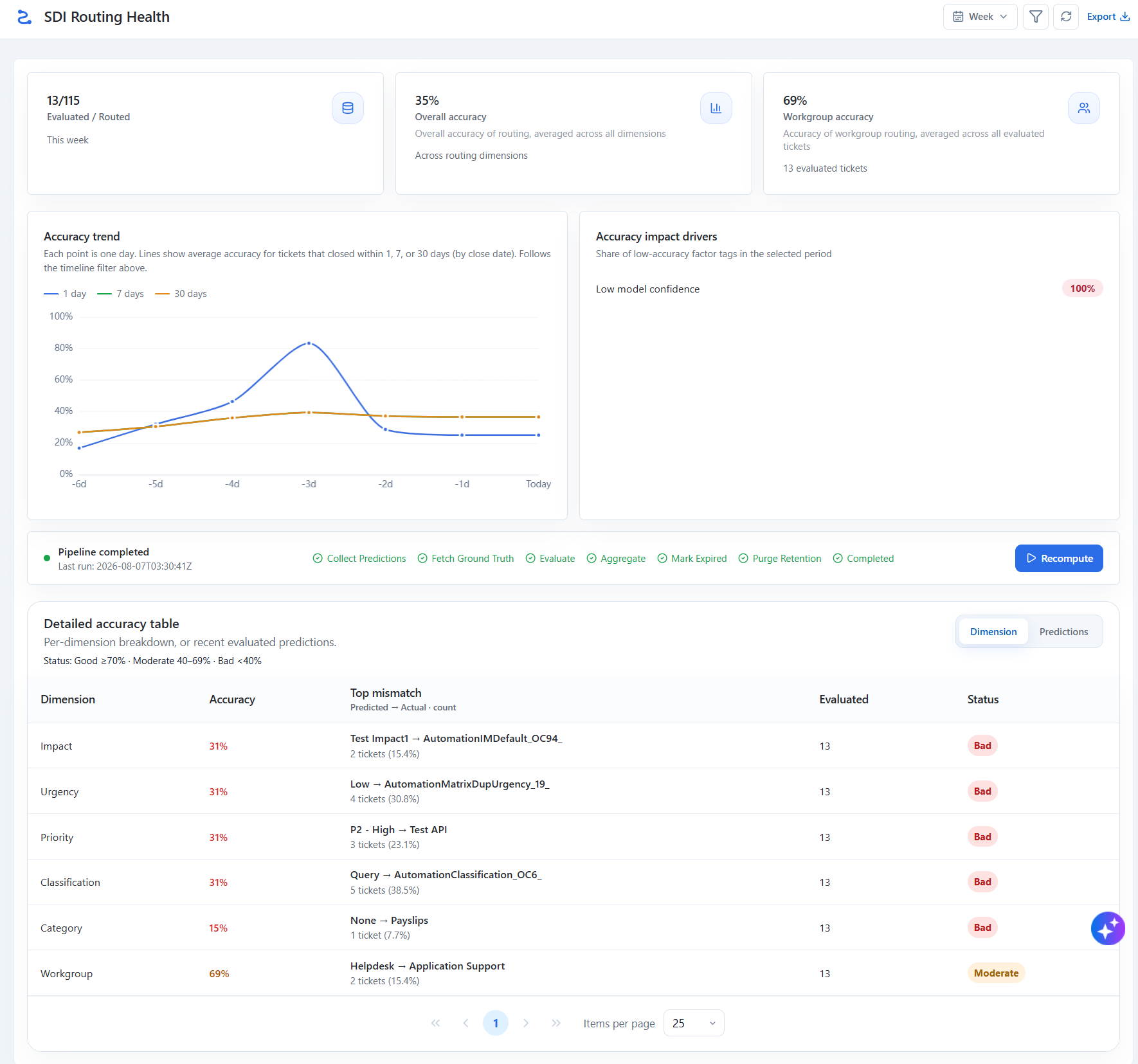
Figure: SDI Routing Health
For more information, refer to SDI Routing Health.
Incident Masters, Tenant and Workgroup APIs
User Persona: Administrator
Why rely on manual incident master management when you can seamlessly integrate and automate it?
The Incident Masters API enables organizations to create, retrieve, update, and manage Incident Master records programmatically, ensuring data consistency, streamlined integrations, and improved operational efficiency across service management processes.
The Tenant API provides a centralized and secure way to create, retrieve, update, and manage tenant information programmatically, supporting scalable administration and seamless integration with enterprise ecosystems.
The Workgroup API enables organizations to manage workgroup information programmatically, facilitating better team administration, streamlined integrations, and improved operational governance.
✅ Perks at a glance
Seamless Integration
Integrate Incident Master data with external applications, monitoring tools, and enterprise systems to eliminate manual data maintenance and improve data accuracy.
Improved Visibility
Access tenant details in real time, enabling administrators and integrated systems to make informed decisions with up-to-date information.
Efficient Workgroup Management
Create, update, and maintain workgroups through APIs, ensuring team structures remain accurate and aligned with business requirements.
For more information, refer to Incident Masters, Tenant and Workgroup API.
Improvements
Following are the improvements in this release.
Improvement Name | Description | Benefits |
|---|---|---|
Report Access and Configuration Enhancements User Persona: Administrator | The Reports module has been enhanced to improve security, accuracy, and usability. The following enhancements have been introduced:
For more information, refer to Report Access and Configuration Enhancements. |
|
SDI - Supported Module Selection User Persona: Administrator | The Service Request (SR) module has been removed from the Module dropdown. The dropdown now displays only the Incident module, ensuring users can select only the modules currently supported by SDI. For more information, refer to Service Desk Intelligence. |
|
Table: Apex Aspen Q3 Feature Improvements
Known Issues
Bug ID | Description |
124172 | RTL Bulletin Direction is Incorrect |
124064 | Uploaded attachment names with special/non-English characters are displayed as ???? |
124076 | LAT: 'Yes' and 'No' buttons are not retained in AIW chat after page refresh |
124106 | Incident API Returns "Object Reference Not Set to an Instance of an Object" When Symptom Is Empty in Incident Creation Payload |
124109 | Incident API Allows Incident Creation Without Mandatory Symptom and Description Fields |
124126 | Code generation fails when clicking Generate button on New Skill page using Text to Code feature |
124325 | Black border is displayed in the empty area of the My Watchlist grid |
124329 | Incident created instead of call record for ambiguous symptom and description |
117776 | Workflow Engine : When multiple components are placed inside 'Error Handler' component and if connected, then the connections are placed outside the 'Error Handler' boundary. |
118574 | Duplicate and irrelevant file being considered for incident creation |
118765 | Workflow Engine : When Notification is triggered due to an Error, then in the triggered email the Mail Body is not rendered as configured. Instead, its merged and shown in single line. |
122440 | Admin Onboarding Agent >> User has only IT Tenant Role template Access but all Tenants Loading where IM Configured. |
122778 | SDI Feature >AIW suggestion values not appending on incident detail page. |
124071 | User Dashboard > Response Needed >AI Engine Fails to Recognize Current Ticket Context When Prompted by User |
124313 | Integration Platform : Loop component execution is getting failed. |
124246 | Auto assignment feature is not working as expected |
124290 | verify Analyst create ticket on behalf of end user |
124310 | IM API>>Category>>Category validation is inconsistent between UI and API, allowing invalid operations |
124311 | Admin>>Discovery>>Inline validation message is not displayed for "Re-enter Password" field on clicking Submit in Monitoring Account Details page |
124312 | Admin>>Custom scheduler>>Jobs are displayed under Custom Scheduler even when the corresponding module is not available in ITSM Summit |
114928 | The Search asset is showing no data when software asset is searched by license name. |
AIW Feature Enhancements
The Product just got smarter with - AIW!
For more information on the AIW Aspen Q3 Release, refer to the AIW Aspen Q3 Release Notes. Here’s a quick look at the key features and enhancements.
Key Highlights
Smart Incident Intelligence - Let AIW turn incident overload into intelligent action—group related incidents, and surface proven solutions to help Analysts prioritize, investigate, and resolve faster.
Trigger Ingestion Pipelines from the UI Admin - Keep AIW knowledge fresh and relevant—sync enterprise content, refresh insights, and deliver smarter, more informed answers.
IT Admin Agent - Stay ahead of IT challenges—centralize administration, optimize performance, and ensure seamless user experiences at scale.
Improvements
‘EU’ Badge Removal
Security Enhancements
To improve application security, Apex Aspen Q3 introduces enhanced DOM Sanitization for AngularJS components. Although AngularJS remains part of the product due to existing framework dependencies, the application code has been updated to sanitize DOM content, mitigating known AngularJS-related security vulnerabilities and strengthening protection against common client-side attacks.
Security Enhancement | Description |
|---|---|
DOM Sanitization for AngularJS Components | Enhanced DOM sanitization has been implemented across AngularJS components to mitigate known AngularJS-related security vulnerabilities. The application code has been updated to sanitize DOM content, improving overall security while continuing to support AngularJS dependencies. |
Component | GPI Reported Version (Tahoe SP3) | Apex Aspen Q3 |
|---|---|---|
JQuery | 1.7.1 | 3.5.1 |
JQuery UI | 1.13.1 | 1.13.2 |
Angular JS | 1.8.0 | 1.8.0 |
Moment.JS | 2.24.0 | 2.29.4 |
Customer Benefits
Benefit | Description |
|---|---|
Improved Security | Reduces exposure to known AngularJS-related vulnerabilities through DOM sanitization. |
Secure Codebase | Enhances client-side code security by sanitizing dynamic DOM content. |
Backward Compatibility | Retains AngularJS support required by existing product dependencies while improving security. |
Reduced Security Risks | Strengthens protection against common client-side vulnerabilities without impacting existing functionality. |
Mitigate Security Vulnerabilities using DOM Sanitization
AngularJS continues to be used in Elbrus SP3 because of existing product dependencies. This enhancement does not remove AngularJS; instead, it mitigates known security vulnerabilities by implementing DOM sanitization and updating the application code.