🎯 Now Live!Release Date | 18th November 2026
Let’s dive into the key highlights, exciting improvements introduced, and a few known issues to keep an eye on. Every update brings something new, with a focus on enhancing the experience!
The following section provides key highlights and known issues in Apex Aspen Q4 release.
Key Highlights
Our team’s been on the move, polishing the UI and adding smarter functionality to power up your daily grind. Curious about What’s New? Dive in and explore the latest highlights - they are too good to miss!
Note
The ITAM New Application and Discovery Module are offered as Beta releases in Apex 2.0 Q4, enabling customers to explore and evaluate the new capabilities prior to general availability.
ITSM Module
Customizable User Dashboard Image Enhancements
User Persona: Administrator, End User
Personalize your dashboard, your way—with custom cover images and flexible layouts.
Give users more control over their dashboard experience with custom cover images and flexible layouts. Administrators can provide up to three cover images, while users can choose their preferred image and switch between Default and Focus layouts for a more personalized and focused workspace.
Personalized Dashboard: Allows users to choose the layout that best suits their needs.
Focused View: The Focus layout provides a structured view of key information.
Easy Personalization: End users can preview and select their preferred cover image through Dashboard Customization.
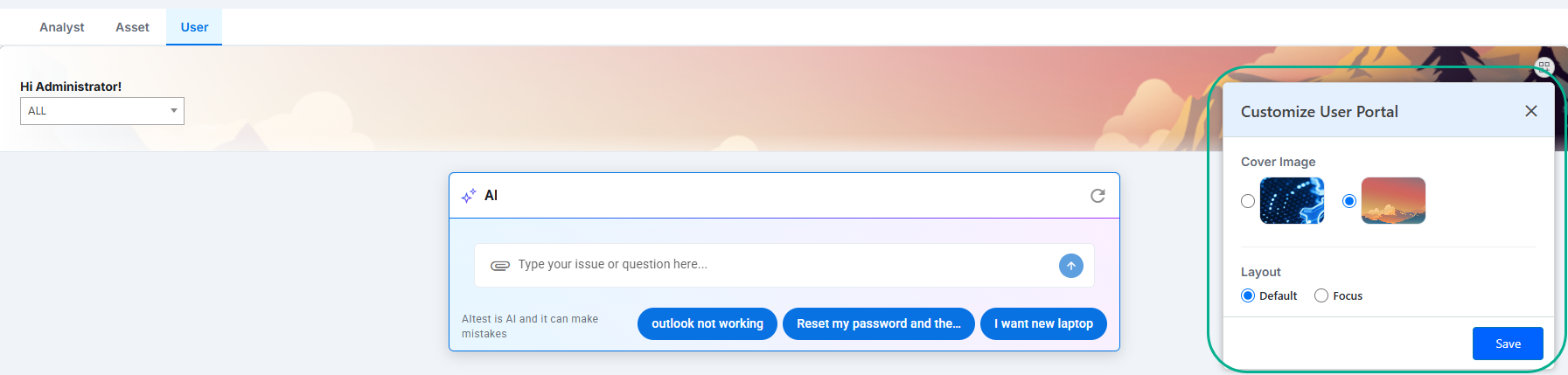
Figure: Customize User Portal - User Dashboard
For more information, refer to User Dashboard and Application Settings.
Business Rule Designer - Change Management
User Persona: Administrator
Automate every change. Simplify every decision.
Simplify Change Management with configurable Business Rules that automate routine actions and enforce consistent processes across the Change lifecycle.
Administrators can define conditions, triggers, and actions to automatically update Change records, send email or SMS notifications. With support for After, Async, and Scheduled execution, organizations can automate both immediate actions and background operations while ensuring changes follow defined business requirements.
Personalized Dashboard: Choose After, Async, or Scheduled execution to support immediate, background, and periodic operations.
Seamless Notifications: Keep stakeholders informed through automated email and SMS notifications.
Controlled Status Transitions: Ensure Change records follow valid status transitions configured at the Admin level.
Consistent Rule Execution: Execute Business Rules before workflows and prevent recursive execution within the same session.
Screenshot
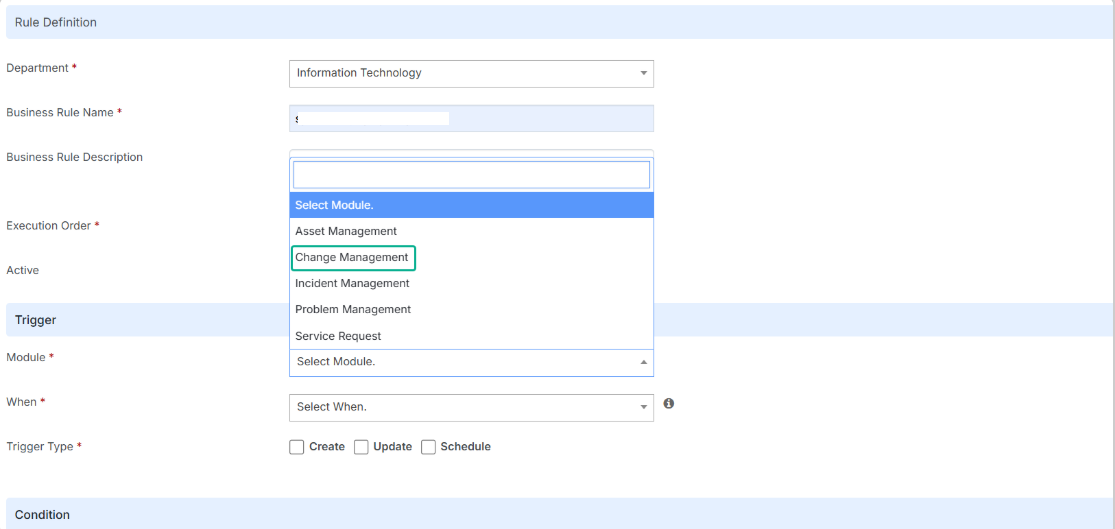
For more information, refer to Business Rule Designer – Change Management.
Unified Service Request Workflow Management
User Persona: Administrator, End User, Approver, Analyst
Automate Service Request workflows, simplify approvals, and improve end-to-end visibility.
The Service Request Workflow Designer introduces configurable, condition-driven workflows for Service Requests. It enables administrators to automate request routing, approvals, and processing using Classic Workflow and Apex Flow.
The integration brings workflow capabilities into existing application touchpoints, allowing end users to track requests, approvers to act on pending approvals, analysts to monitor workflow progress, and administrators to manage workflow configurations
Automated Workflows: Trigger matching workflows based on Service Request conditions.
Simplified Approvals: Approve, Reject, or Refer Back to requests.
Real-Time Notifications: Access pending approvals through the top-panel notification icon.
Workflow Visibility: Track approval stages, status, and approver actions.
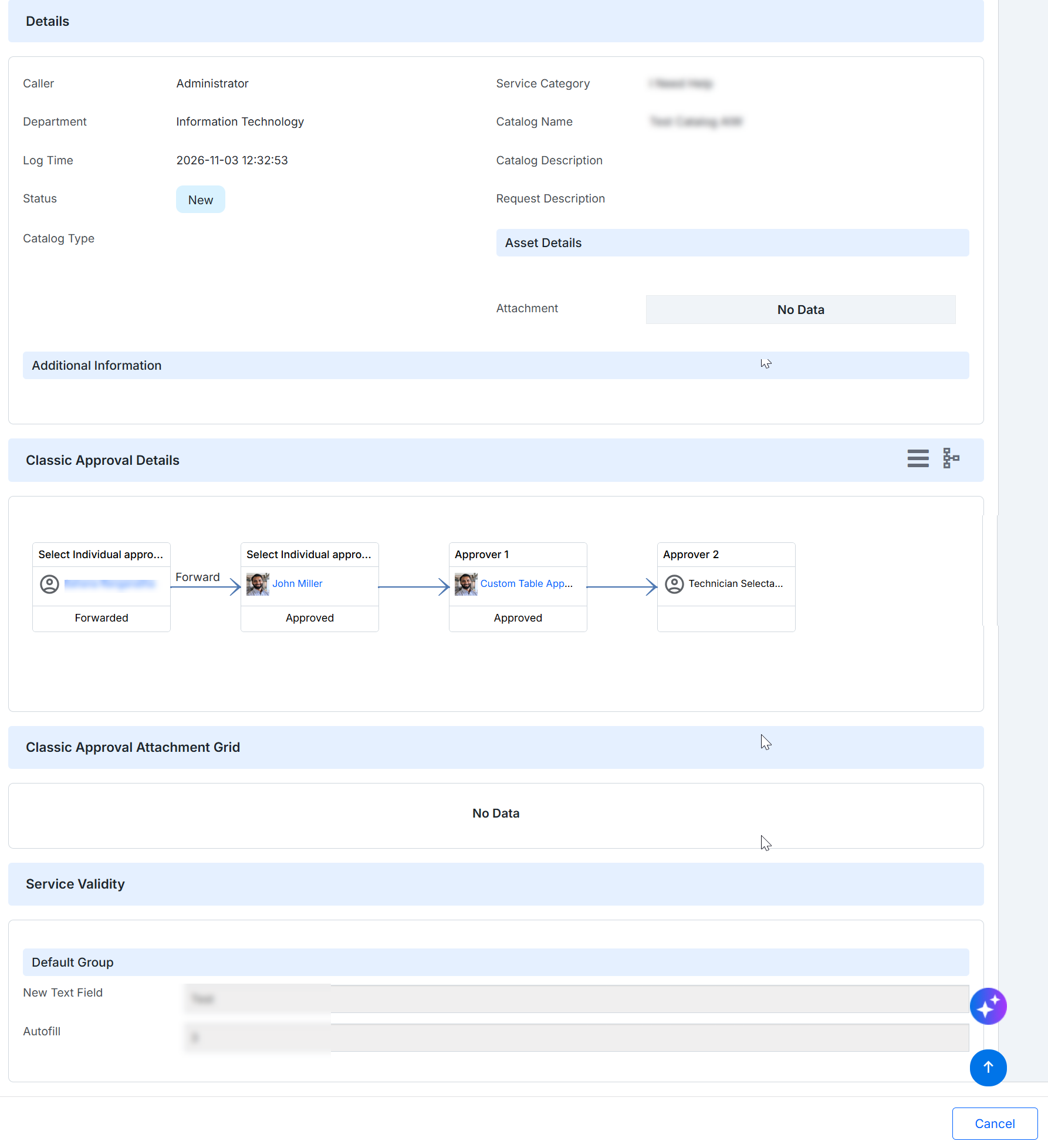
Figure: Classic Approval Details
For more information, refer Approve Service Requests.
AIW Configurations – Intelligent Search and Administration
User Persona: Administrator, IT Administrator, End User
Make AI-driven service management smarter and simpler.
Enhance AIW with vector-based semantic catalog search, a centralized Admin Console for configuration management, and expanded IT Admin Agent – Phase II capabilities with the required API support.
✅ Perks at a glance
Smart Catalog Search: Delivers relevant catalog recommendations based on user intent.
Centralized Configuration: Simplifies AIW configuration management.
Enhanced IT Administration: Extends IT Admin Agent capabilities through additional API support.
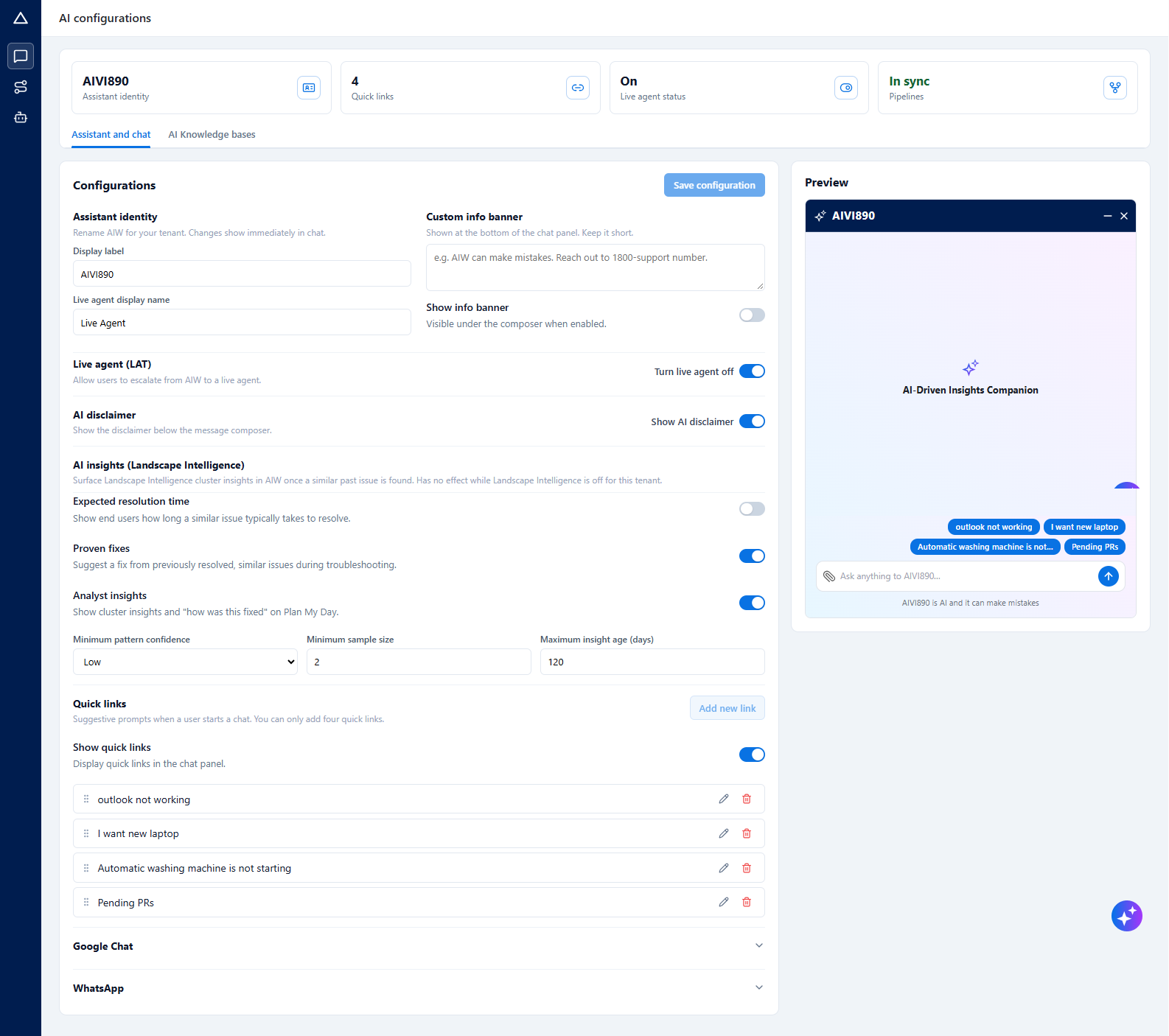
Figure: AIW Configuration
For more information, refer AIW Configuration.
Landscape Intelligence – AI-Powered Incident Automation
User Persona: IT Administrator
Proactively identify incident patterns and streamline incident resolution with AI-driven intelligence
Enhance Landscape Intelligence with capabilities for incident storm alerting, workflow-based auto-remediation, automatic major incident linking, and resolution-time estimation to improve incident management and operational efficiency.
✅ Perks at a glance
Incident Storm Alerting: Identifies and alerts on incident surges.
Auto-Remediation: Triggers automated remediation through workflows.
Major Incident Linking: Automatically links related incidents to major incidents.
Resolution-Time Estimates: Predicts incident resolution timelines.

Figure: Landscape Intelligence
For more information, refer Landscape Intelligence.
App Integration and Enhanced Workflow Design
User Persona: Administrator
Simplify app integration and workflow orchestration with reusable, no-code capabilities.
Enable administrators to configure integrations once and reuse them across multiple workflows without writing custom code. Enhance workflow design with Join and Branch features to support flexible workflow execution and orchestration.
✅ Perks at a glance
Reusable Integrations: Configure apps once and reuse them across multiple workflows.
No-Code Configuration: Simplifies app integration without custom development
Flexible Workflows: Use Join and Branch nodes to manage workflow paths and execution.
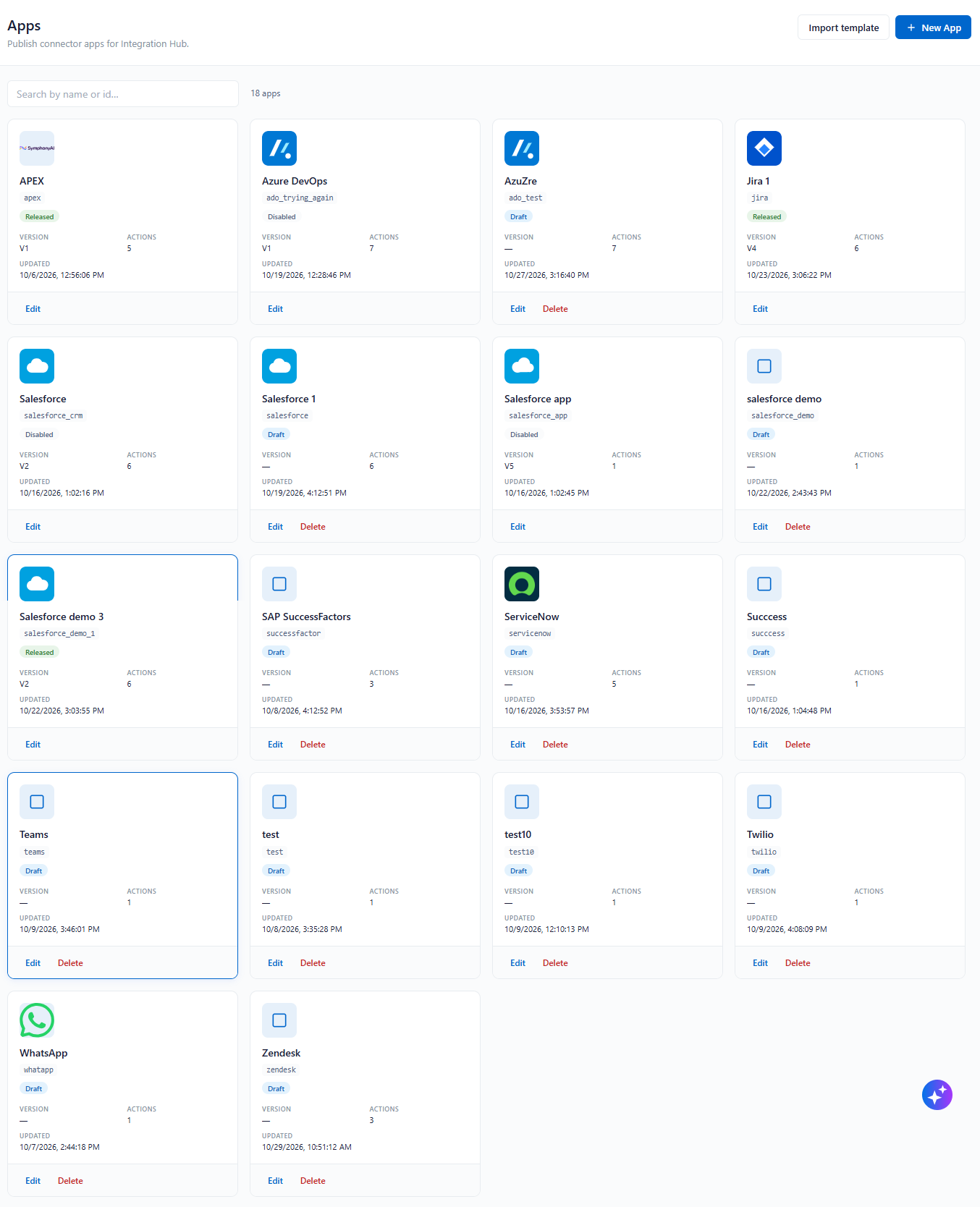
Figure: Apps
For more information, refer Apps
Report Co-ownership and Sharing
User Persona: Administrator and End User
Share reports effortlessly and enable better team collaboration with Report Co-ownership.
The Report Co-ownership feature allows report owners to share their reports with selected users within the same customer environment. Multiple users can access shared reports based on the permissions granted by the owner, reducing dependency on administrators for individual sharing requests.
✅ Perks at a glance
Flexible Report Sharing: Allows report owners to share reports with selected users.
Improved Collaboration: Enables multiple users to access shared reports.
Reduced Administrative Effort: Eliminates the need for administrators to manage every sharing request.
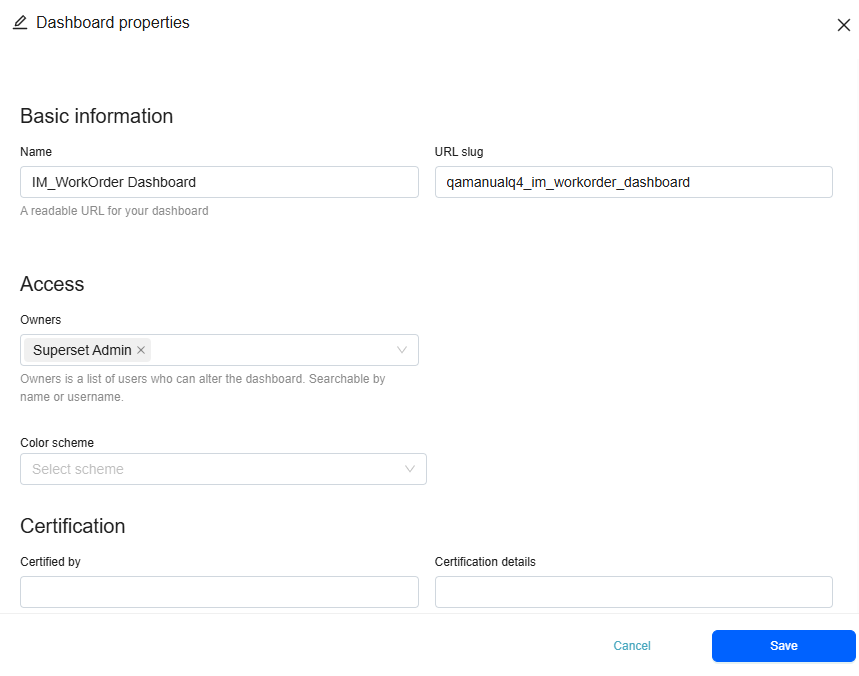
Figure: Dashboard Properties
For more information, refer Create Dashabord.
UI Refresh - Password Management Module
User Persona: Administrator, End User
A fresh coat to Password Management module.
Password Management module gets a visual refresh with a cleaner interface. The updated UI brings greater clarity and smoother navigation across screens, making it easier to explore options and complete tasks, even on longer pages.
Consistent experience: Aligns the Project Management interface with other application modules, providing a familiar and uniform look and feel.
Smoother navigation: Improved screen consistency and streamlined option selection make everyday tasks easier and faster.
Better usability: A clear, uniform interface helps users navigate workflows with greater ease and complete tasks more efficiently.
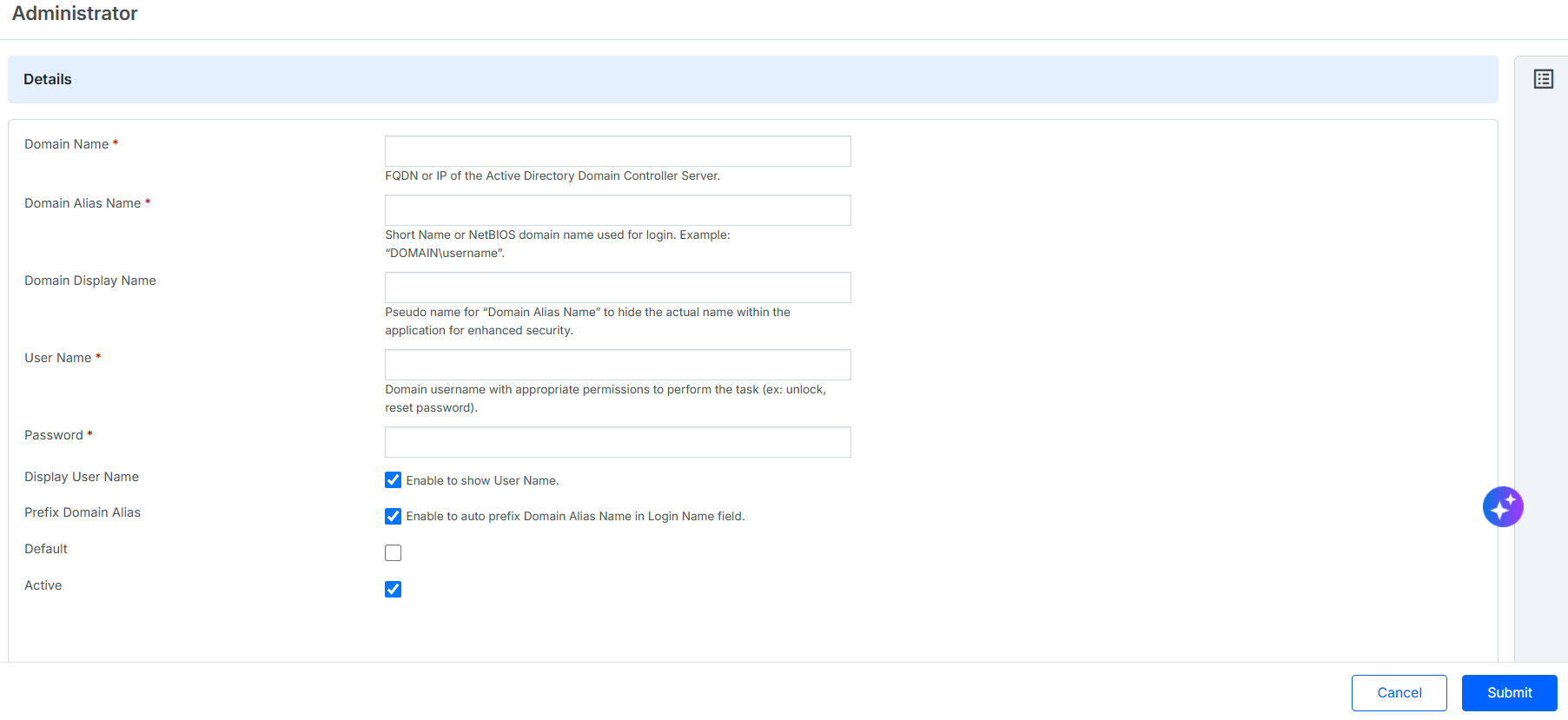
Figure: Password Management Module
For more information, refer to Password Management.
AI Powered Approvals
User Persona: Analyst, Approver
Automate every change. Simplify every decision.
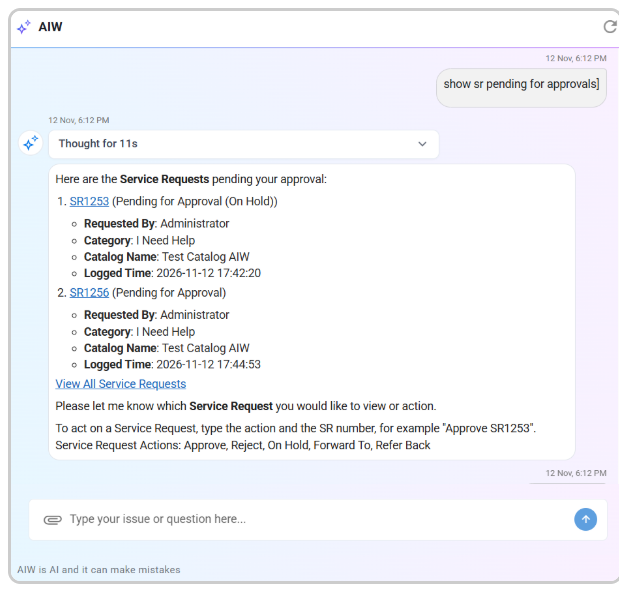
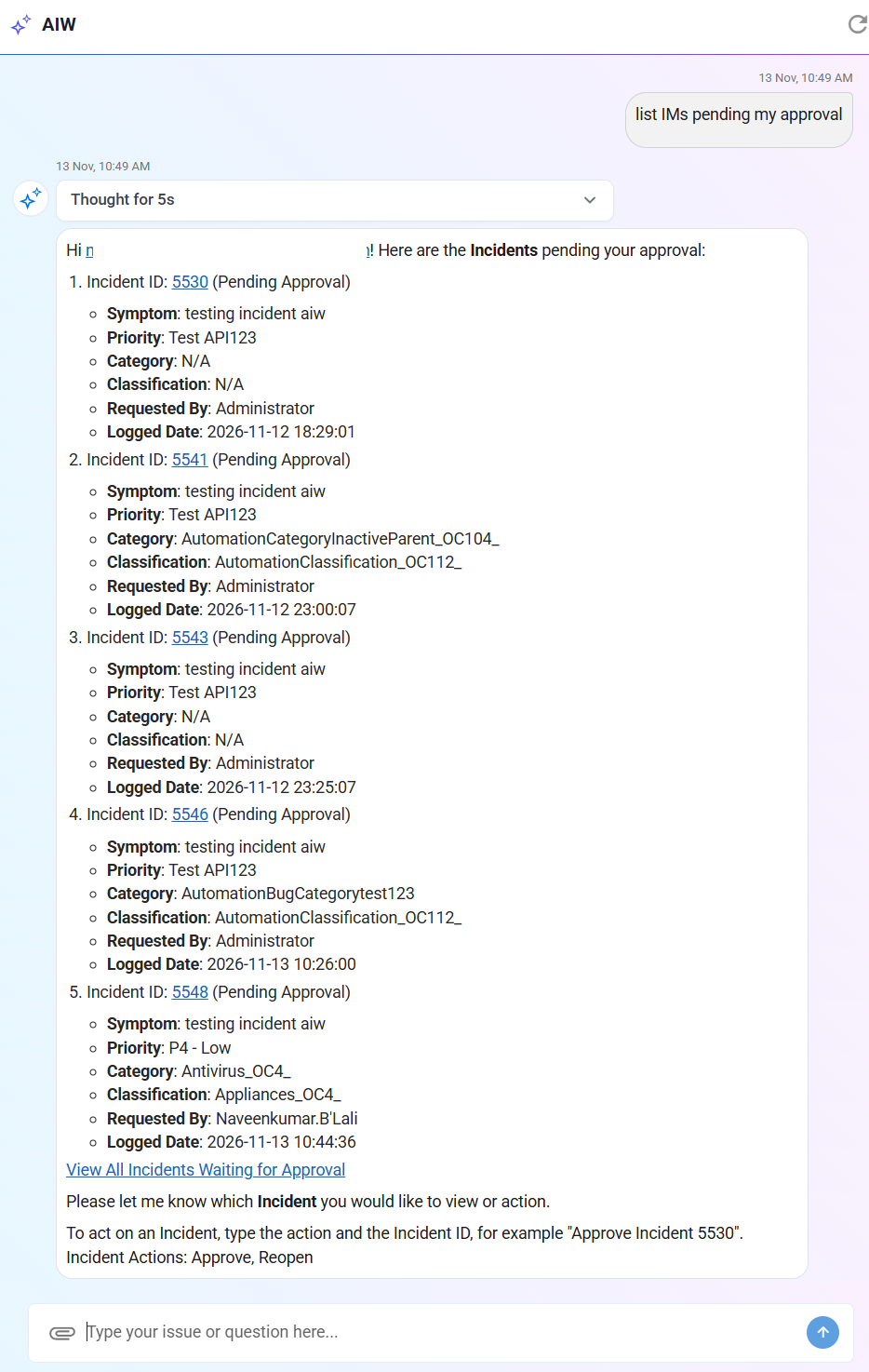
AIW now streamlines Incident Management (IM) and Service Request (SR) approval processes through AI-powered recommendations and guided conversational workflows. It analyzes ticket details, approval stages, workflow history, and comments to recommend appropriate actions and, where applicable, suggest the next approver.
Authorized users can view pending approvals, review ticket context, and perform module-specific actions directly through AIW chat. For SRs, supported actions include Approve, Reject, Forward To, On Hold, and Refer Back. For Incidents, users can perform the supported approval and reopen actions based on the configured workflow.
AIW also enables users to access pending approvals and referred-back Service Requests directly from the Apex dashboard's Approvals and Refer Backs tower. By validating workflow rules, presenting relevant recommendations, and requiring remarks only when mandatory, AIW simplifies approval handling and reduces manual navigation.
AI-Powered Recommendations: Get contextual approval recommendations based on ticket details, workflow stages, and approval history.
Centralized Approval Visibility: View pending Incident and SR approvals directly through AIW chat.
Guided Workflow Actions: Approve, Reject, Forward To, On Hold, or Refer Back Service Requests through conversational interactions.
Faster Decision-Making: Review ticket context and suggested recipients before confirming approval actions.
Screenshot - AIW powered Approvals and Refer Backs Tower
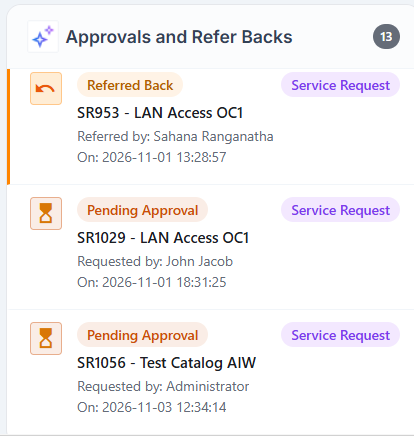
Screenshot - AIW approvals for SR
Screenshot - AIW approvals for IM
For information refer to User Dashboard.
Business Rule Designer - Knowledge Management
User Persona: Administrator
Knowledge Business Rules let administrators automate actions when users create or update Knowledge Articles, or when a scheduled trigger runs. Administrators can define conditions using Knowledge-specific attributes and configure email notifications or API actions.
Flexible Triggering and Conditions
Run rules on create, update, or schedule. Configure condition groups with AND between conditions in a group and OR between condition groups; the logical operator defaults to AND.
Knowledge-Specific Notifications
Send email notifications to Knowledge roles, workgroup members, customers, or custom email addresses, and personalize messages with Knowledge Article keywords.
API Integrations
Invoke an internal or third-party endpoint when a trigger fires and its conditions match. Use Async execution for background notifications and integrations.

Figure: Knowledge Business Rule
For details, see Business Rule Designer - Knowledge Management.
Asset Module
Unified Data Model
One model. Consistent asset data across the enterprise.
UDM provides a unified framework for modeling asset data across the enterprise. Administrators can define reusable attributes, leverage automatic inheritance, and configure category-specific fields without duplicating effort. The result is standardized asset data, simplified administration, and scalable asset management. Predefined L1-L3 UDM Layers to simplify asset allocation and provision to configure and create Categories at L4 layer using Form designer.
Single Source: Maintain asset definitions from a centralized model.
Automatic Inheritance: Propagate attributes across all child asset categories.
Rapid Configuration: Build new asset categories faster with reusable templates.
Data Consistency: Standardize asset information enterprise-wide.
Reduced Effort: Minimize duplicate configuration and maintenance tasks.
Controlled Flexibility: Combine governance with category-specific customization.
Future Ready: Scale asset management without redesigning data structures.
Flexible Form Customization: Create category-specific forms with custom attributes, sections, and 2- or 3-column layouts.
Enhanced Data Validation: Configure input types, validation rules, mandatory fields, and duplicate value controls for accurate data capture.
Smart Dropdowns & Dependencies: Use master sources and parent-child mappings to dynamically filter dropdown values based on selections.
Simplified User & Hierarchical Selection: Enable Tree controls for location-based selections and User Search to automatically fetch matching usernames.
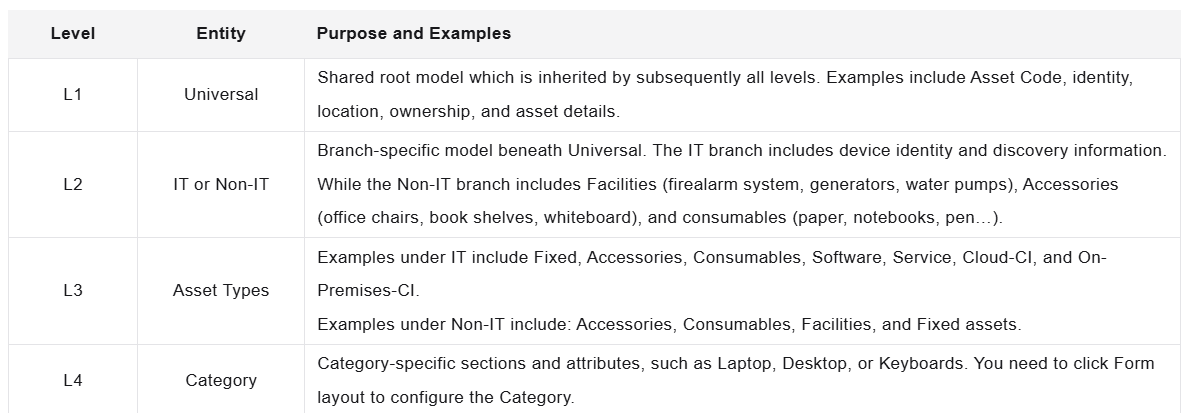
Figure: UDM Layers
UDM Model to create custom attributes at different levels of Assets.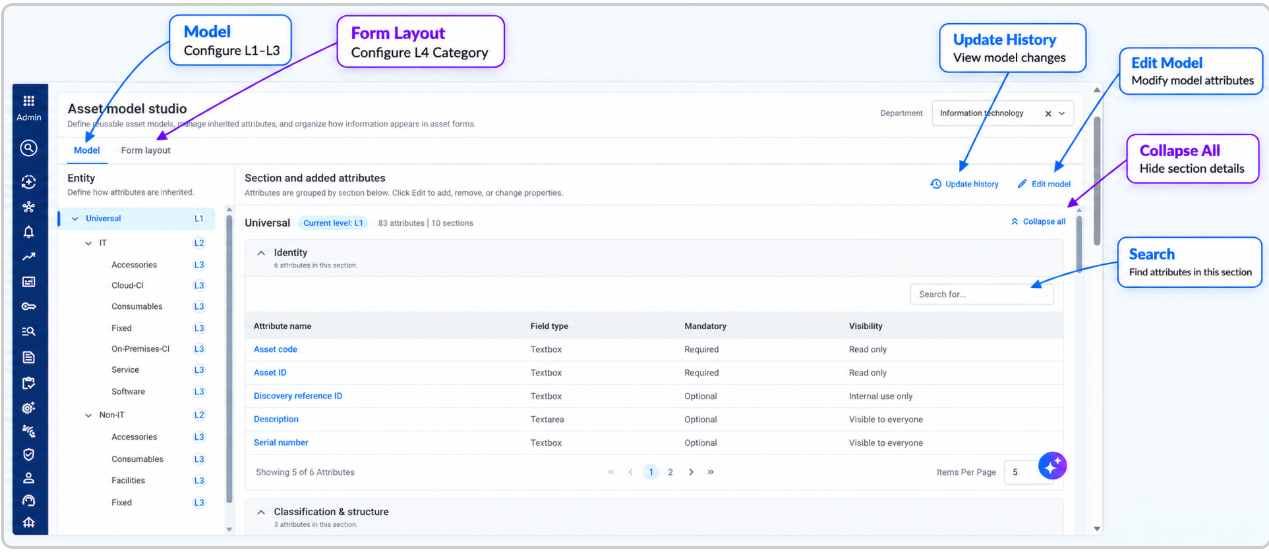
Figure: UDM Model
Categories to be created at Level-4 using inherited asset attributes, with provision to defined custom attributes with various controls at L4 level.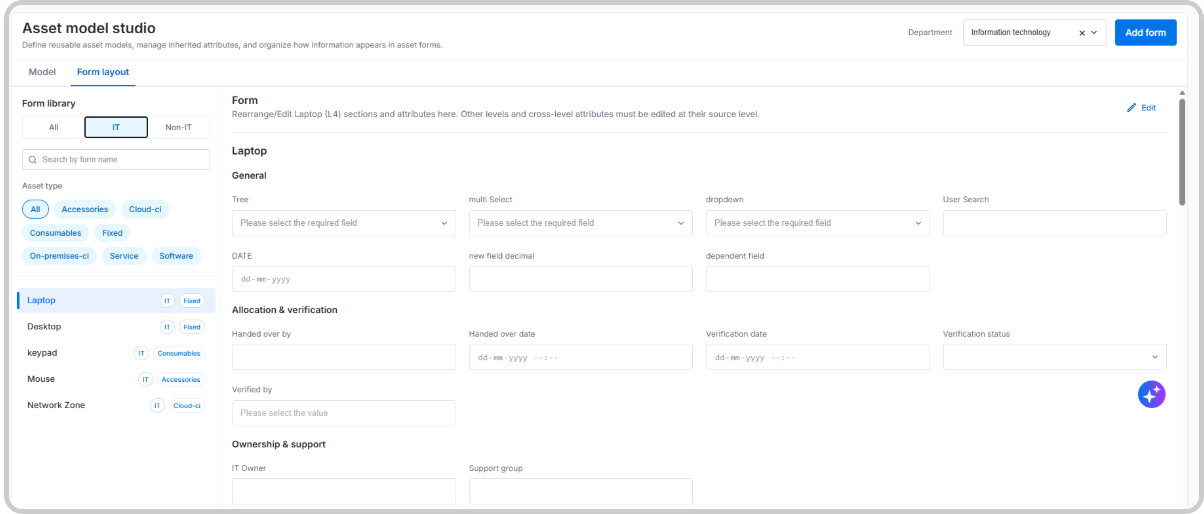
Figure: Form layout for L4 Categories
For more information, refer to Unfieid Data Model and Form Layout documentation.
Dynamic Asset Forms with Dependent Attribute Configuration
The enhanced Asset Form Configuration allows administrators to define parent-child attribute dependencies, configure conditional field visibility, and filter child values based on parent-field selections. These configurations apply to Add Asset and Edit Asset forms, supporting adaptive forms and multi-level cascading dropdowns for more relevant and accurate data entry.
Parent-Child Attribute Configuration: Establish relationships between parent and child attributes to control how field values depend on one another.
Conditional Field Visibility: Show or hide fields dynamically based on configured conditions and parent-field selections, keeping forms relevant to the selected context.
Dependent List Filtering: Automatically filter child-field value lists based on the value selected in the associated parent field, helping users choose valid and relevant options.
Add Assets, Asset Inventory List, My Asset List
Enhanced Asset Creation, Inventory Views, and Bulk Operations.
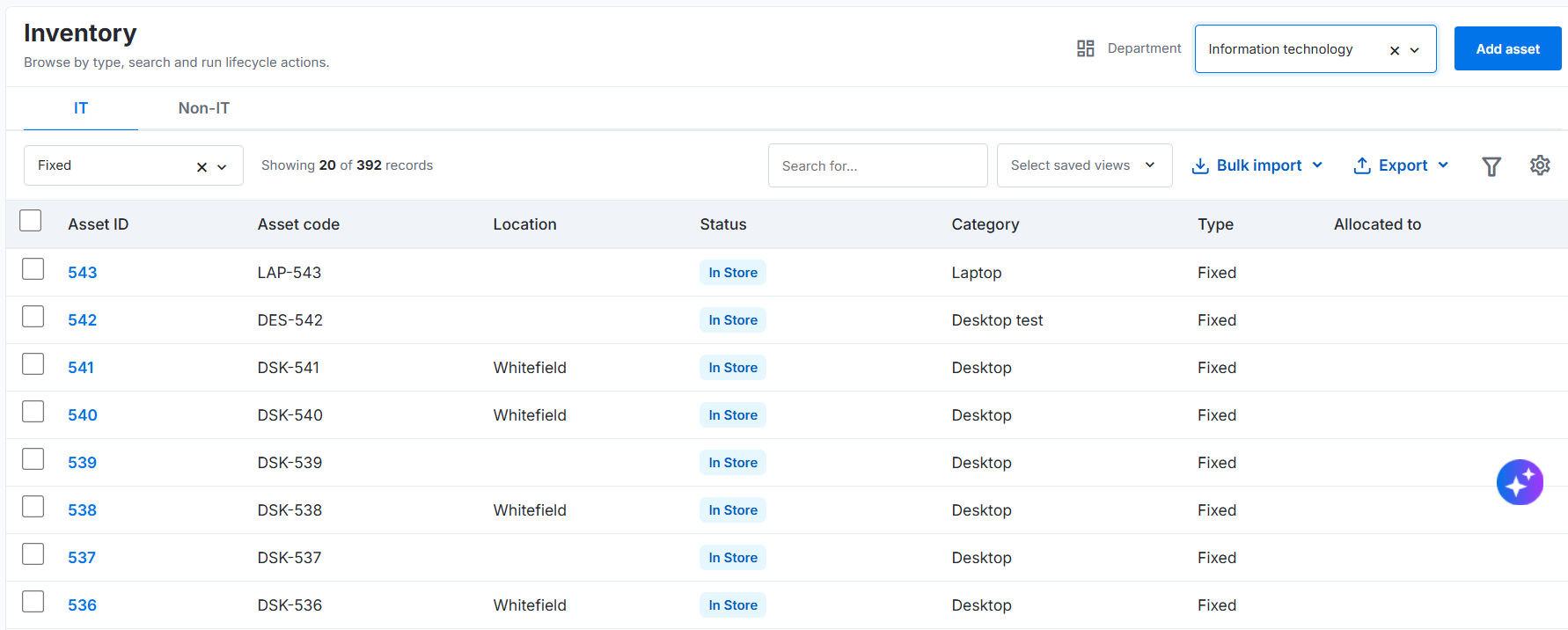
The enhanced Asset Management experience simplifies how organizations create, manage, and track their IT and Non-IT assets. Administrators and IT teams can add assets through a guided workflow, manage inventory records, and perform individual or bulk operations. Employees can also access their assigned asset records, acknowledge pending assignments, and update permitted information.
With improved inventory visibility and self-service capabilities, teams can streamline asset-related activities, reduce manual effort, and maintain better accountability across the organization.
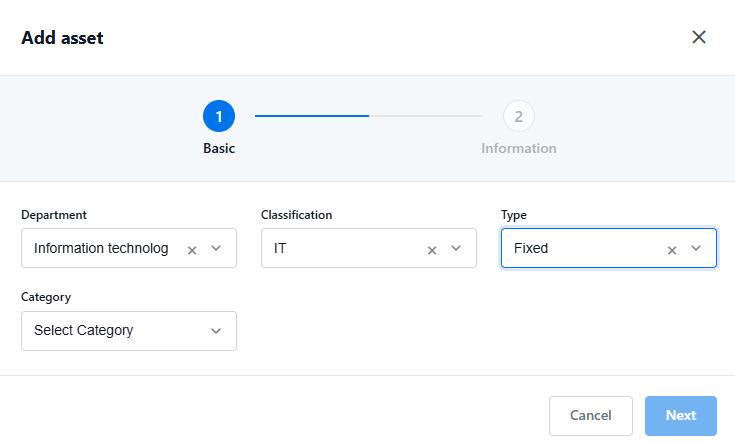
Simplified Asset Creation: Add assets through a guided two-step process. Select the department, classification, type, and category, then enter the relevant category-specific information to create structured asset records.
Efficient Asset Operations: Perform supported actions on individual or multiple asset records. Manage unit-based and quantity-based assets, with support for bulk operations on up to five records.
Employee Self-Service: Allow employees to view their associated assets, accept or reject pending assignments with remarks, and update attributes for which they have been granted edit access.
Screenshot - Add asset
Screenshot - Asset Inventory List
Screenshot - My Asset List
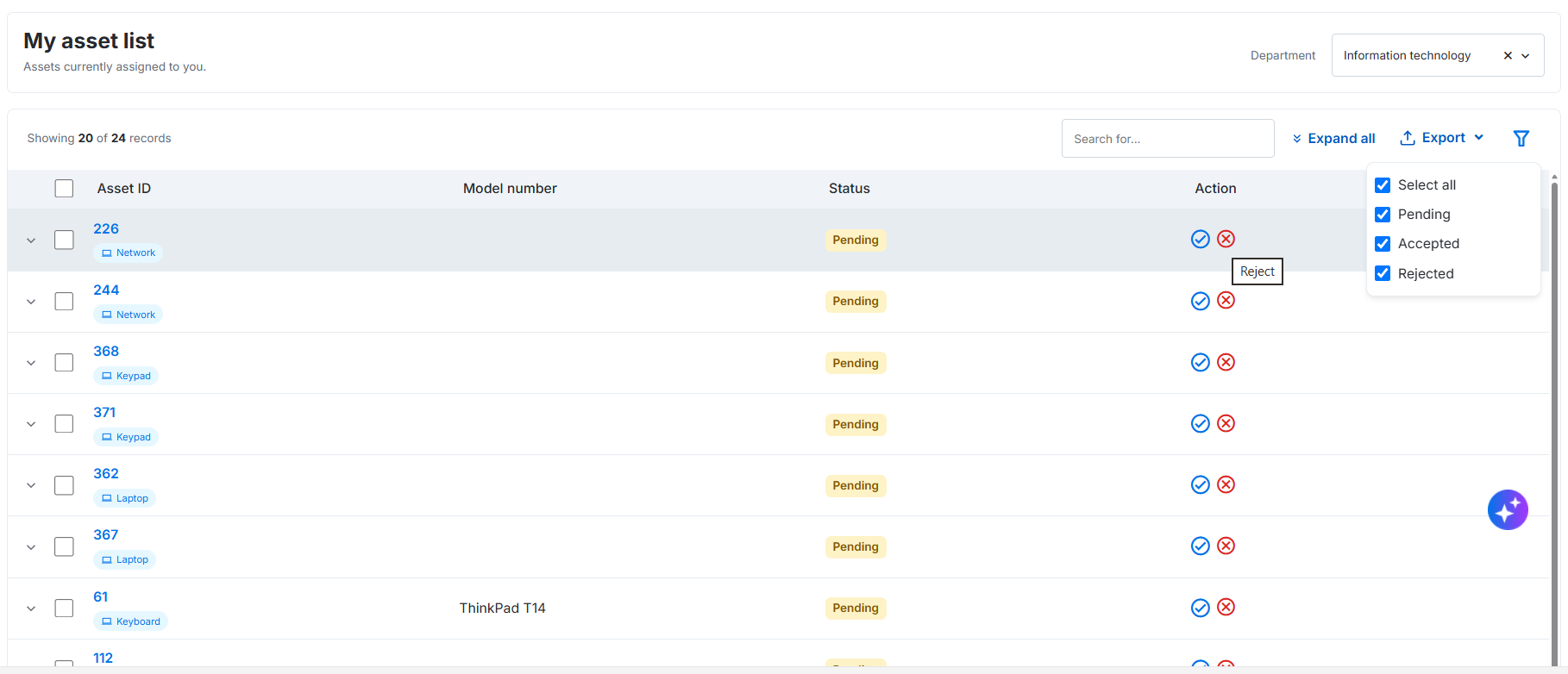
For more information, refer to Add Assets, Viewing Asset Details and My Asset List.
View Discovered Details for the Mapped Assets
User Persona: Analyst
Connect Assets to Discovery. Simplify Investigation.
IT Analysts can now navigate directly from an asset record to its associated discovered device details using the new Discovery Info option in the Asset Details popup. When an asset is linked to a discovered device through a valid discovery ref ID, the option is displayed in the popup header. It provides quick access to detailed device information, including hardware, software, network configurations, changes, and vulnerabilities.
This enhancement simplifies asset investigation by connecting Asset Management with the Discovery module, eliminating the need to manually search for discovered devices.
One-Click Device Access: Navigate directly from an asset record to its associated discovered device details.
Improved Discovery Visibility: Access comprehensive hardware, software, and network information collected through discovery.
Faster Troubleshooting: Review device configurations, changes, and vulnerabilities to support effective investigation.
Screenshot
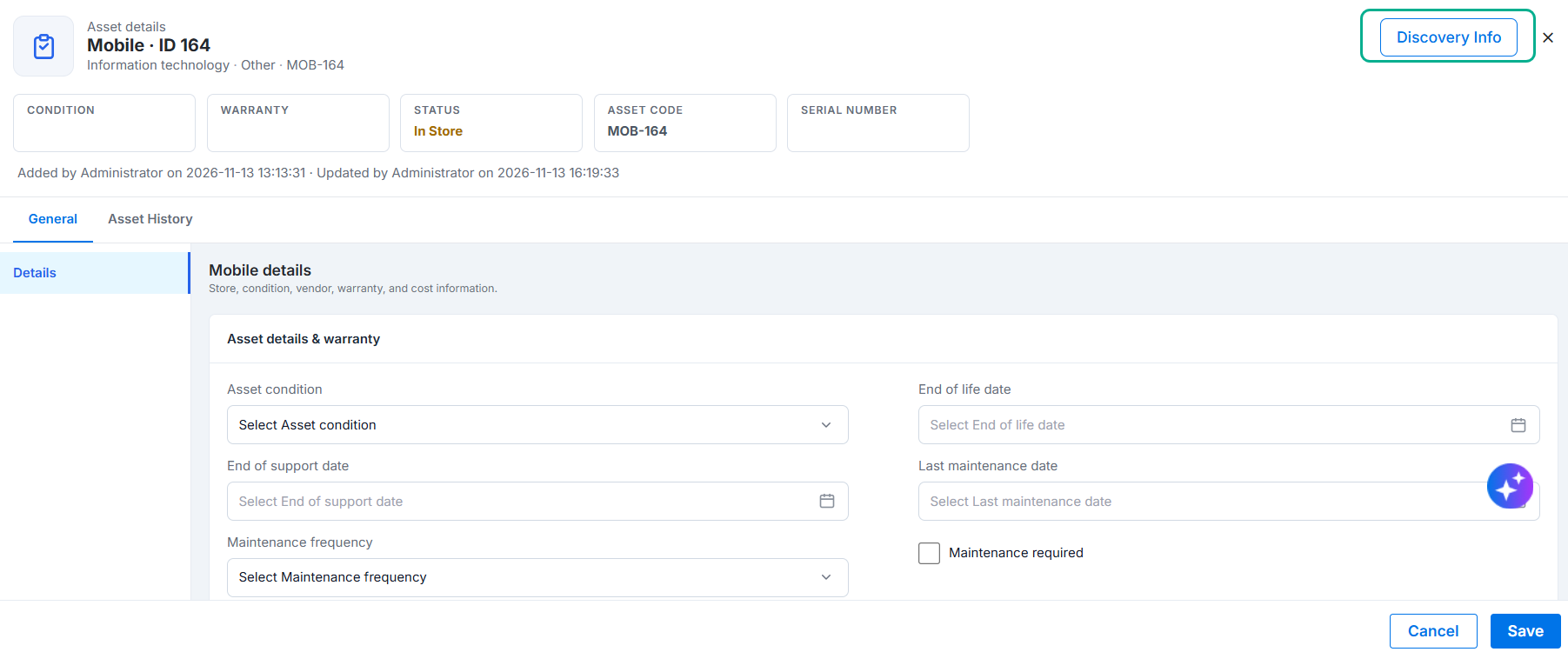
Figure: Discovery Info
Flexible Asset Lifecycle and Status Configuration
User Persona: Admin
Your assets. Your statuses. Your lifecycle.
Asset Lifecycle Management is now more flexible, giving administrators greater control over how assets progress through their lifecycle. With configurable asset statuses and lifecycle transitions, organizations can move beyond predefined workflows and tailor asset management processes to their operational needs.
Administrators can independently configure asset statuses and lifecycle flows for IT and Non-IT classifications, associate statuses with specific asset types, and designate initial statuses to define where an asset's lifecycle begins. They can also customize transitions between statuses to accommodate business-specific requirements, such as introducing additional stages after asset receipt or changing the status assigned after deallocation.
This enhancement simplifies lifecycle customization, improves control over asset movement, and enables organizations to adapt asset management workflows as their business requirements evolve.
Configure Your Own Statuses: Create and manage asset statuses based on IT and Non-IT classifications and specific asset types.
Separate Statuses from Transitions: Define available asset statuses independently and configure how assets move between them.
Set the Starting Point:: Designate an Initial Status to define where an asset begins its lifecycle.
Customize Every Transition: Adapt asset movement to business requirements by configuring lifecycle transitions and introducing additional stages.
Adapt as Your Business Evolves: Move beyond fixed lifecycle workflows with the flexibility to accommodate changing asset management processes.
Screenshot
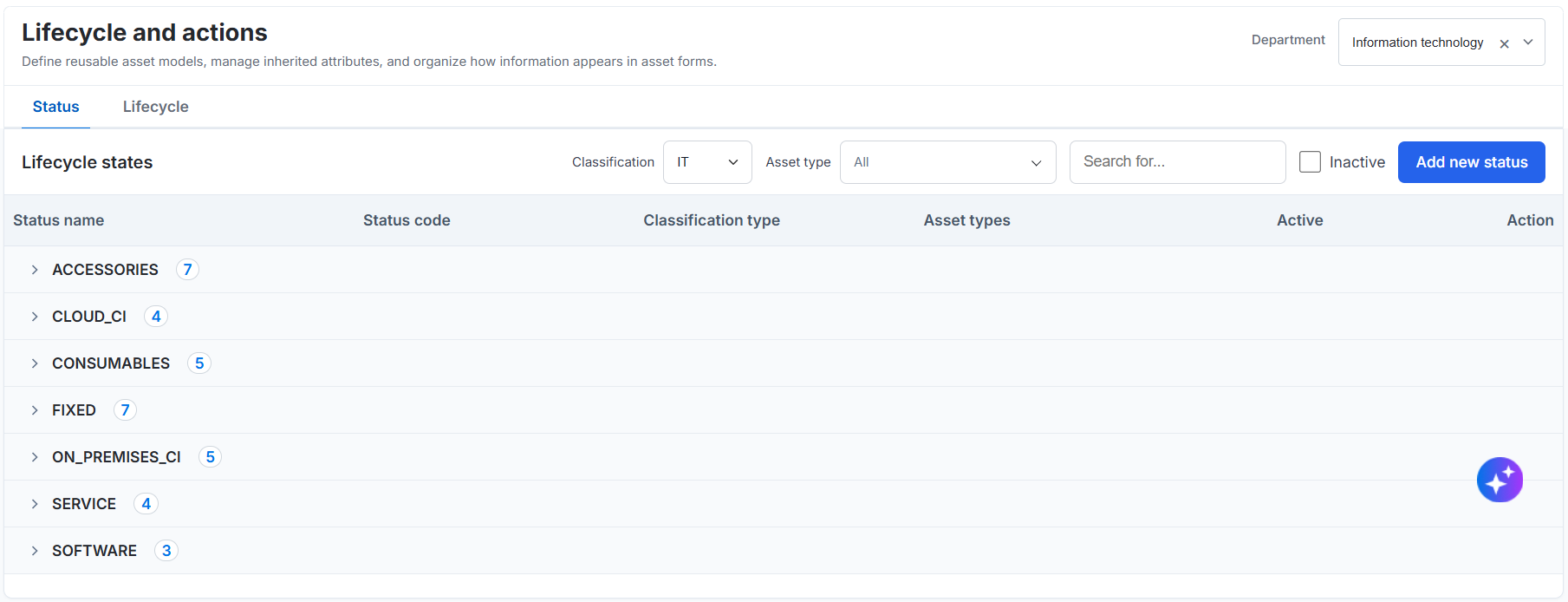
For more information, refer to Lifecycle and Actions.
Platform Master
User Persona: Administrator
Build a more connected enterprise with structured, reusable master data.
Simplify enterprise data management with centralized masters for Locations, Cost Centers, Departments, Projects, and Common Masters. Administrators can define organizational hierarchies, establish ownership, manage financial associations, and maintain reusable values from a unified framework.
These enhancements ensure consistent data attribution across ITSM and ITAM modules while improving operational visibility and governance.
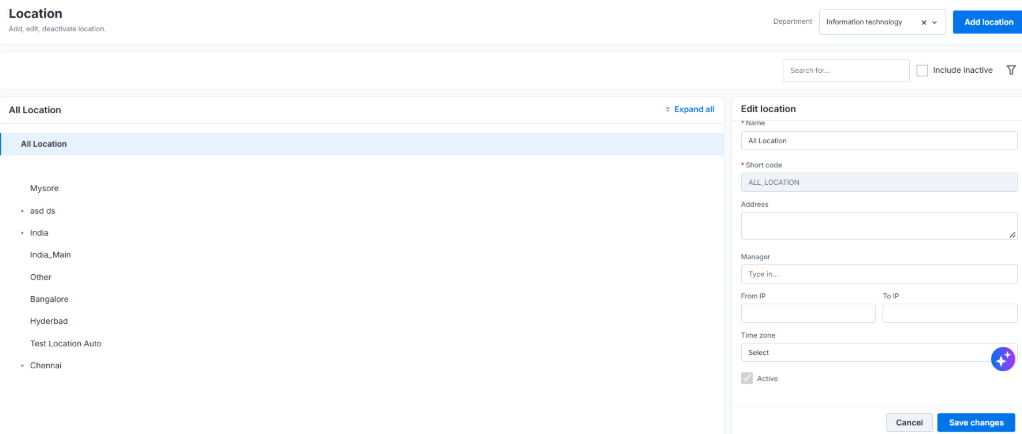
Hierarchical Location Management: Create and manage branches, regions, and sub-locations with flexible parent-child relationships for accurate record routing and assignment.
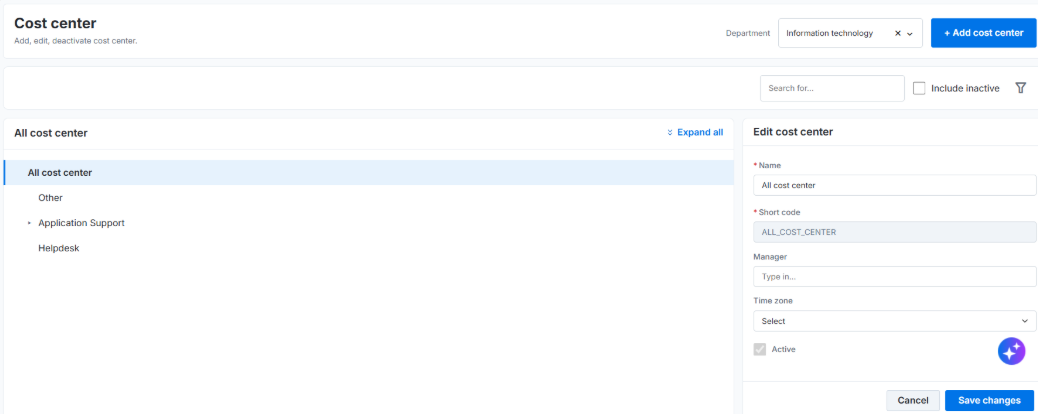
Structured Cost Center Management: Maintain centralized, domain-scoped cost centers to enable consistent financial attribution and better cost visibility.
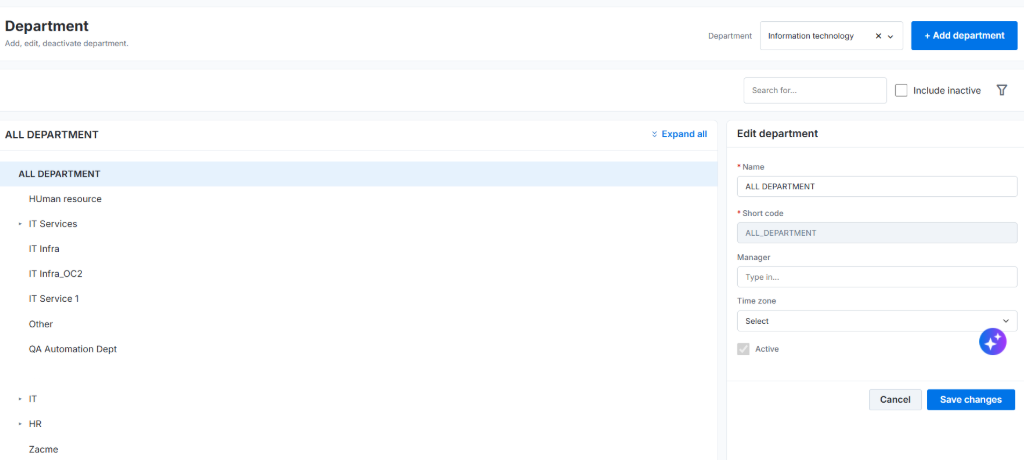
Organized Department Hierarchies: Define departments, assign managers, and establish organizational structures to strengthen ownership and accountability.
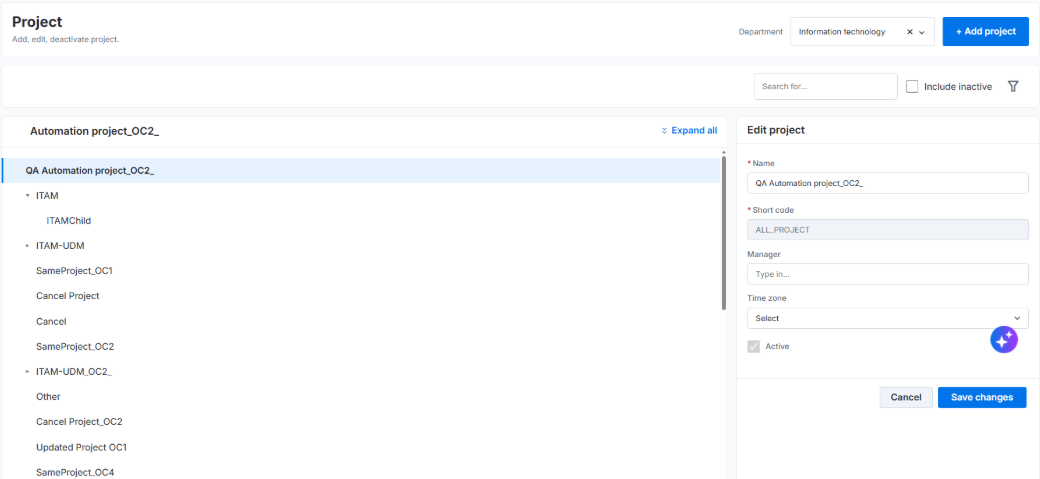
End-to-End Project Tracking: Associate projects with cost centers, locations, and departments for consistent operational and financial tracking across modules.
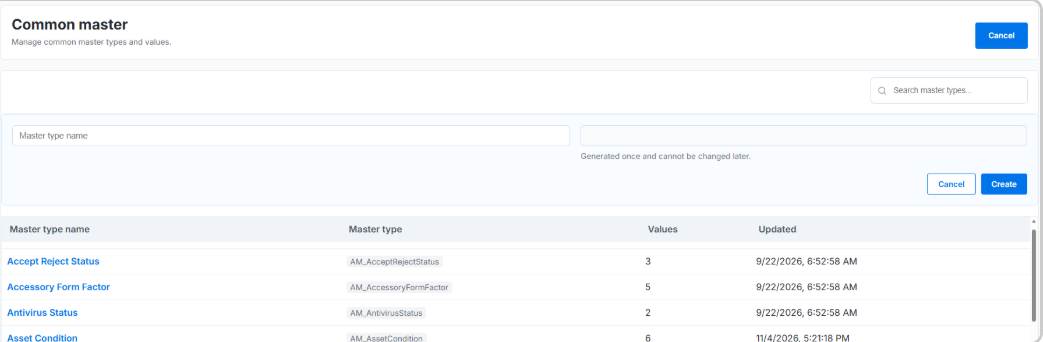
Flexible Common Master Configuration: Create and update master types, manage child values, and deactivate obsolete values to keep enterprise data relevant and reusable.
Screenshot - Cost Center
Screenshot - Project Master
Screenshot - Department Master
Screenshot - Location Master
Screenshot - Common Master
For more information, refer to Cost Center, Project, Department, Location and Common Master.
Raynet Integration for Advanced Software Asset Management
User Persona: Administrator
The Raynet integration connects asset discovery and software normalization workflows in Apex 2.0 with Raynet. Administrators choose which discovered assets to submit for normalization, and Raynet retrieves the selected inventory through the integration APIs, normalizes the software data, and stores the results in Raynet. Administrators can open Raynet from Apex 2.0 through the Data Hub single sign-on experience.
Administrator-Controlled Asset Selection
Choose which discovered assets to process. Discovery does not automatically submit assets to Raynet; Raynet retrieves only assets an administrator selects and submits for normalization.
Automated Inventory Handoff
Raynet retrieves the submitted asset inventory from Apex 2.0 through the integration APIs, reducing the need to manually transfer software inventory between systems.
Normalized Results in Raynet
Raynet normalizes the submitted software data and stores the normalized results in Raynet for administrators to review.
Single Sign-On Access
Open Raynet from ITAM > Asset > Advanced SAM > Data Hub in Apex 2.0. The integration validates the user and launches Raynet in a new browser tab, where the user’s Raynet permissions determine access.
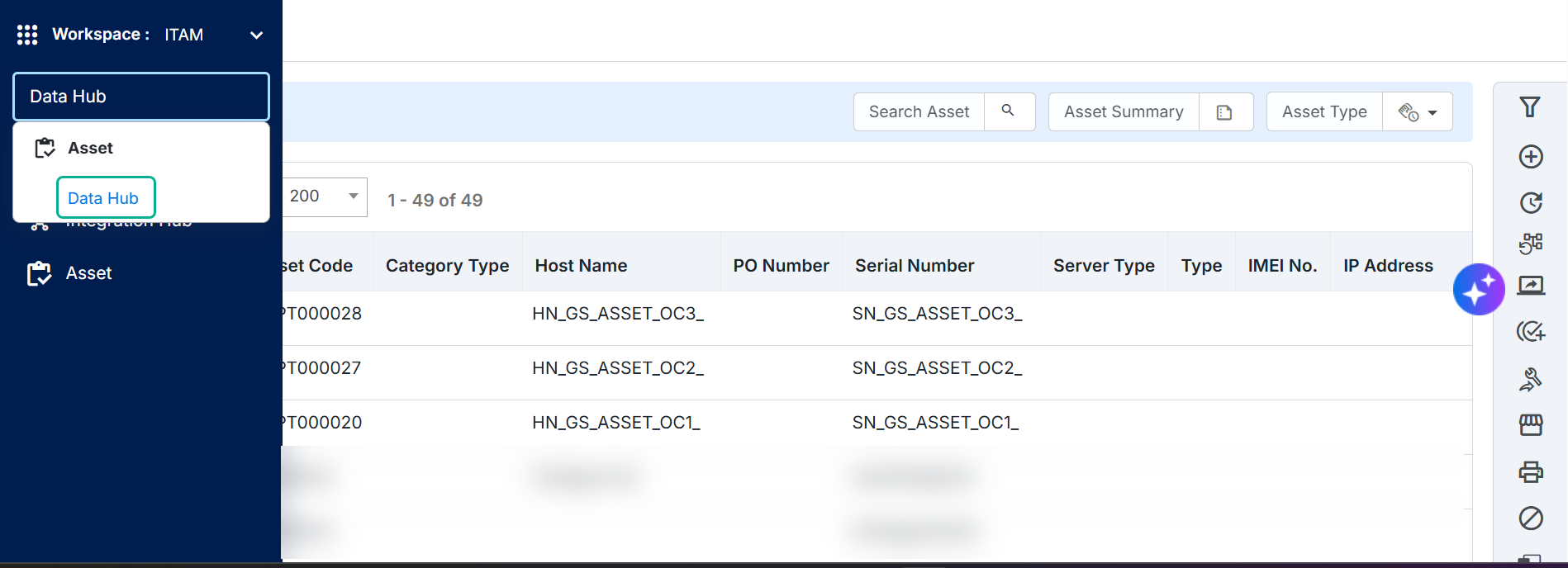
Figure: Raynet Integration
For details, see Data Hub.
Asset Overview Dashboard
A Unified View of Asset Operations
The enhanced Asset Overview Dashboard provides ITAM analysts with a consolidated view of asset inventory, utilization, lifecycle status, and asset movements. It includes interactive widgets to monitor asset activities, identify items requiring attention, and drill down into relevant inventory records. Analysts can filter information by department, IT/Non-IT classification, and asset type for better visibility and faster decision-making.
Unified Asset Visibility: Monitor asset inventory, utilization, and lifecycle status in one place.
Actionable Insights: Identify activities requiring attention through My Action Queue.
Lifecycle Tracking: Monitor asset movements, allocation trends, and recent activities.
Quick Navigation: Drill down into relevant inventory records directly from supported widgets.
Screenshot
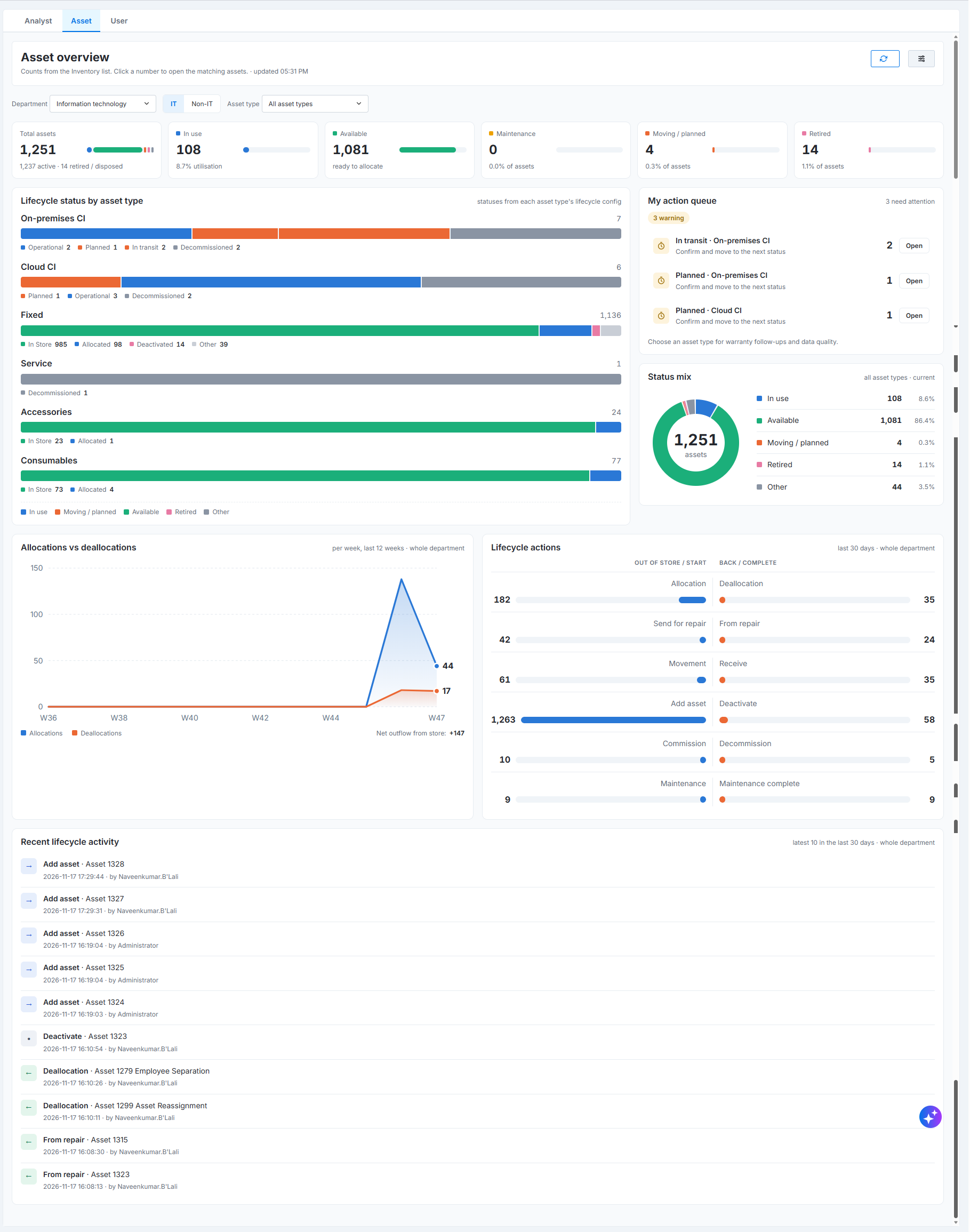
For more information, refer to Asset Dashboard Overview.
Discovery Module
Discovery Jobs
Discover, schedule, and maintain asset visibility from a single workspace.
User Persona: Discovery Administrator
Discovery Jobs enable organizations to identify devices, systems, and resources across their IT environment and collect inventory data for effective asset management. Administrators can configure discovery sources, targets, credentials, schedules, and collection settings through a centralized workflow. The solution supports multiple discovery types, including Network, Cloud, Container, Hypervisor, Database, Directory, and Storage/SAN, helping maintain accurate and up-to-date asset inventories.
Comprehensive Discovery
Discover assets across on-premises, cloud, virtualized, containerized, database, and storage environments.Flexible Scoping
Define discovery targets using single hosts, IP ranges, CIDR subnets, host lists, and exclusions.Automated Scheduling
Run discovery jobs on demand or schedule recurring scans to keep inventory data current.Protocol Intelligence
Leverage WMI, SSH, SNMP, and other discovery methods with protocol-specific credentials.Actionable Insights
Review job, host, and device-level results to validate coverage and identify collection gaps.Operational Visibility
Monitor job status, scan history, coverage metrics, logs, and failures from a unified interface.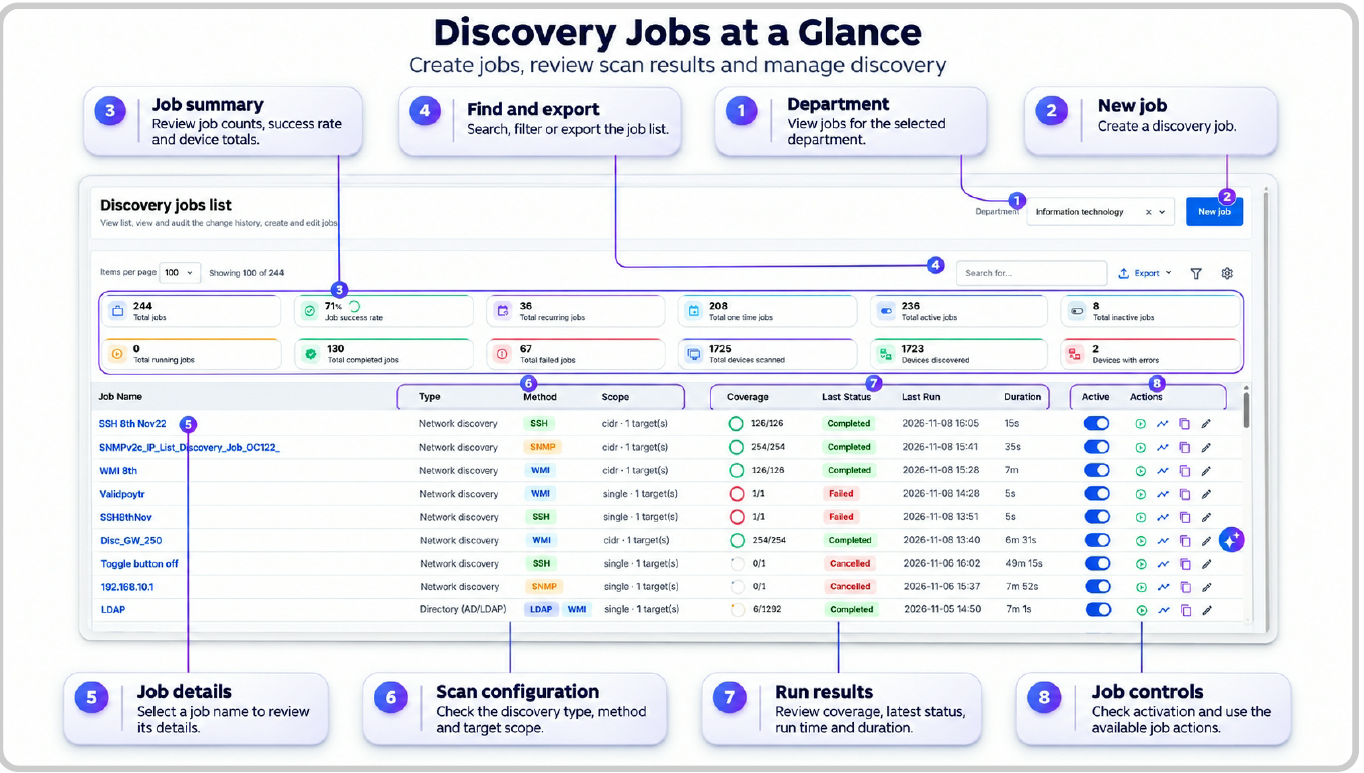
Figure: Discovery Jobs
For more information on how to configure Discovery Jobs, refer to Discovery Jobs.
Discovered Devices and Details
User Persona: Analyst
How can analysts quickly understand what discovery found, assess its quality, and connect each result to the right asset? The Discovered Devices experience brings discovered inventory and device-level information together so analysts can review, investigate, and manage discovery results from one place.
Unified Discovery Inventory
Review discovered network devices, cloud resources, containers, hypervisors, databases, and API-discovered network resources by department and category. Summary cards provide counts and context for discovery method, operating system, mapping, availability, and discovery health.
Find and Manage Records
Search by device details, filter records, sort supported columns, customize the table, and export results to CSV or Excel. Link a discovered device to an existing asset or create an asset when no matching record exists.
Detailed Device Insights
Open a device record to review its identity, availability, scan history, collection status, and Discovery Score. The details view organizes available information into Overview, Hardware, Software, Network, and category-specific tabs for cloud, containers, hypervisors, and databases. Analysts can also review detected changes and raw discovery data.
Coverage Across Technologies
Review cloud resources from AWS, Azure, GCP, and OCI; Docker and Kubernetes resources; Hyper-V, VMware, Xen, and Nutanix hosts; and SQL Server, MySQL, PostgreSQL, Oracle, and MongoDB instances. Available properties vary by resource type, platform, discovery method, and collected data.
.png?sv=2026-02-06&spr=https&st=2026-11-20T21%3A21%3A49Z&se=2026-11-20T21%3A54%3A49Z&sr=b&sp=r&sig=X8tlYanvQBL9mjhPcAe6Jy60XJEH9UNL6mjMJVPlaeQ%3D)
Figure: Discovered Devices
For details, see Discovered Devices
Asset Mapping
User Persona: Administrator and Analyst
Asset Mapping connects discovery results with the ALM asset model by defining the asset category, matching criteria, and field mappings applied to discovered devices. Administrators can use these configurations to link devices to existing assets or create new asset records with consistent business and inventory information.
Category-Based Mapping
Map discovered devices to ALM asset categories such as Desktop, Laptop, Network, or Server. Configure mappings for a selected tenant, category, discovery type, and optional discovery method.
Flexible Matching Rules
Use discovery-specific unique identifiers to link discovered devices to existing assets or configuration items. When the system does not find a matching asset, Condition Builder rules determine whether the system can classify the device and create a new asset automatically.
Discovery-to-Asset Field Mapping
Map discovery attributes to category attributes so that the system populates asset records with the required technical, business, and operational information. Available attributes depend on the selected asset category and discovery type.
Support Across Discovery Technologies
Configure mappings for network, cloud, hypervisor, database, and container discovery. The system uses discovery-specific identifiers, such as hardware serial numbers, cloud resource IDs, platform UUIDs, database identifiers, Docker Engine IDs, and Kubernetes cluster IDs, to reconcile discovered resources with assets or configuration items.
Mapping Status and Activity Summary
Review the mapping status of discovered devices and identify the associated asset from the Discovered Device List page. The Last Mapping Activity card summarizes Qualified, Processed, Mapped/Upserted, Unmapped, and Error records for the latest mapping activity.
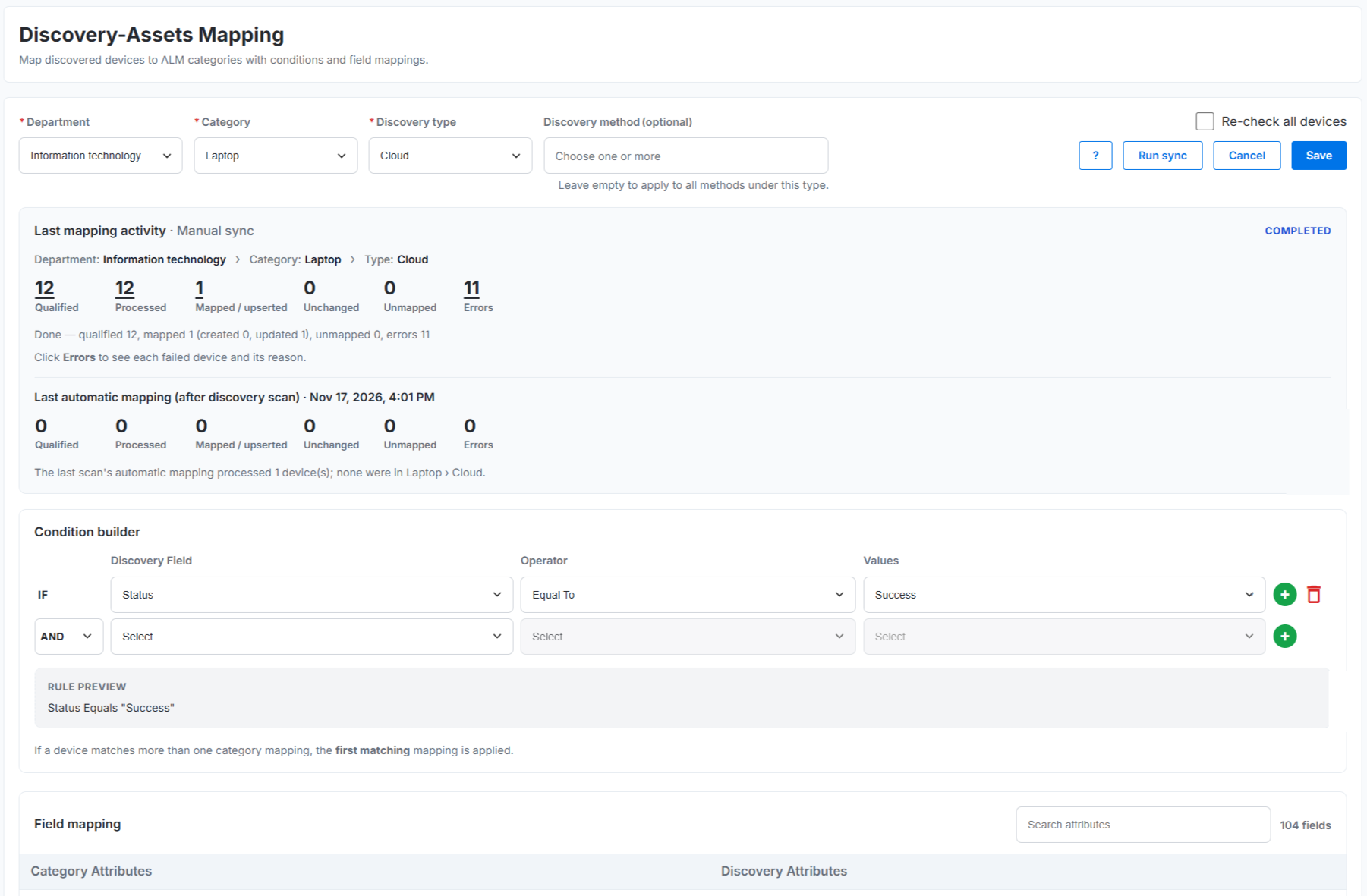
For details, see Asset Mapping.
Discovery Worker Installation and Administration
User Persona: Administrator
The Discovery Worker Installation and Administration experience provides the requirements and procedures needed to install, configure, check, maintain, and remove the Discovery Worker on Windows and Linux systems. The worker operates within the customer network, receives discovery activities from Temporal, collects data from approved targets, and securely submits the results to the Discovery platform.
Secure Customer-Environment Deployment
Deploy the Discovery Worker within the customer environment so that discovery activities run close to approved target systems. The worker uses mutually authenticated TLS certificates to connect securely to the Temporal server and uses an Ingest API key to submit collected data to the Discovery service.
Guided Connection Configuration
Configure the Temporal server URL, namespace, task queue, worker identity, Discovery API URL, Ingest API key, and tenant ID during installation. The installer validates the configuration, installs the worker components, and displays the installation result.
Secure Discovery Within the Customer Environment
Install the Discovery Worker within the customer environment to keep discovery operations inside the customer network. Secure communication, certificate-based authentication, and controlled access help protect discovery activities and collected data.
Broad Hardware Discovery Coverage
Because the Discovery Worker runs within the customer environment, it can connect directly to approved network segments and discover a broad range of reachable hardware devices across the infrastructure.
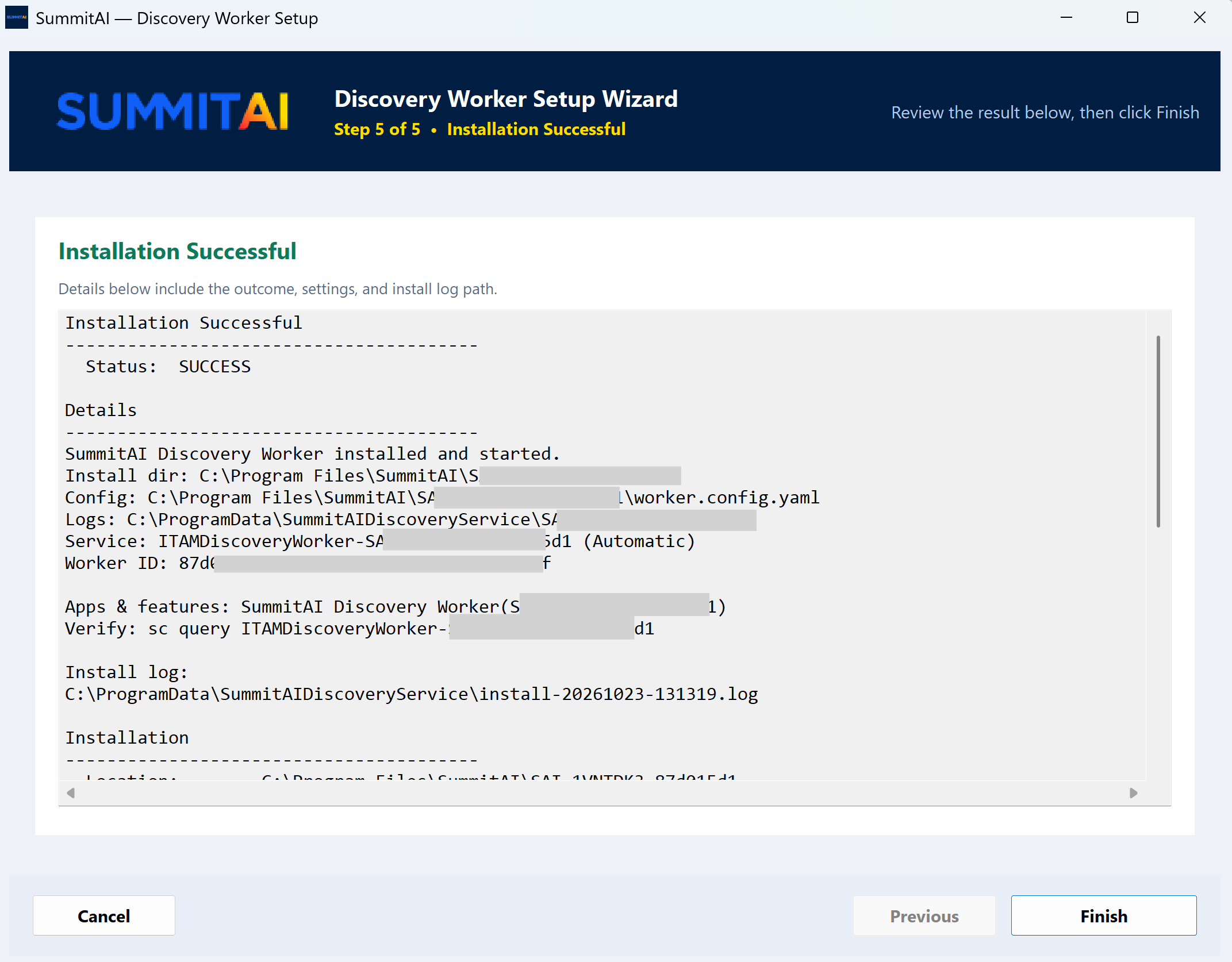
Figure: Discovery Worker Installation
For details, see the Discovery Worker Installation and Administration Guide.
Discovery Worker
User Persona: Administrator
The Discovery Worker page provides an operational view of the hosts running Discovery Worker instances. Administrators can review host-level worker counts and per-worker health, then open a host network diagram to inspect connection status and worker details.
Host and Worker Health Monitoring
Review the number of workers on each host and how many are Up or Down. Search the host list and refresh to check the latest status and connectivity data.
Per-Worker Connectivity Details
Select a host to view its network diagram, worker versions, and live or disconnected connection links. This helps administrators determine whether a discovery issue affects one worker or the entire host.
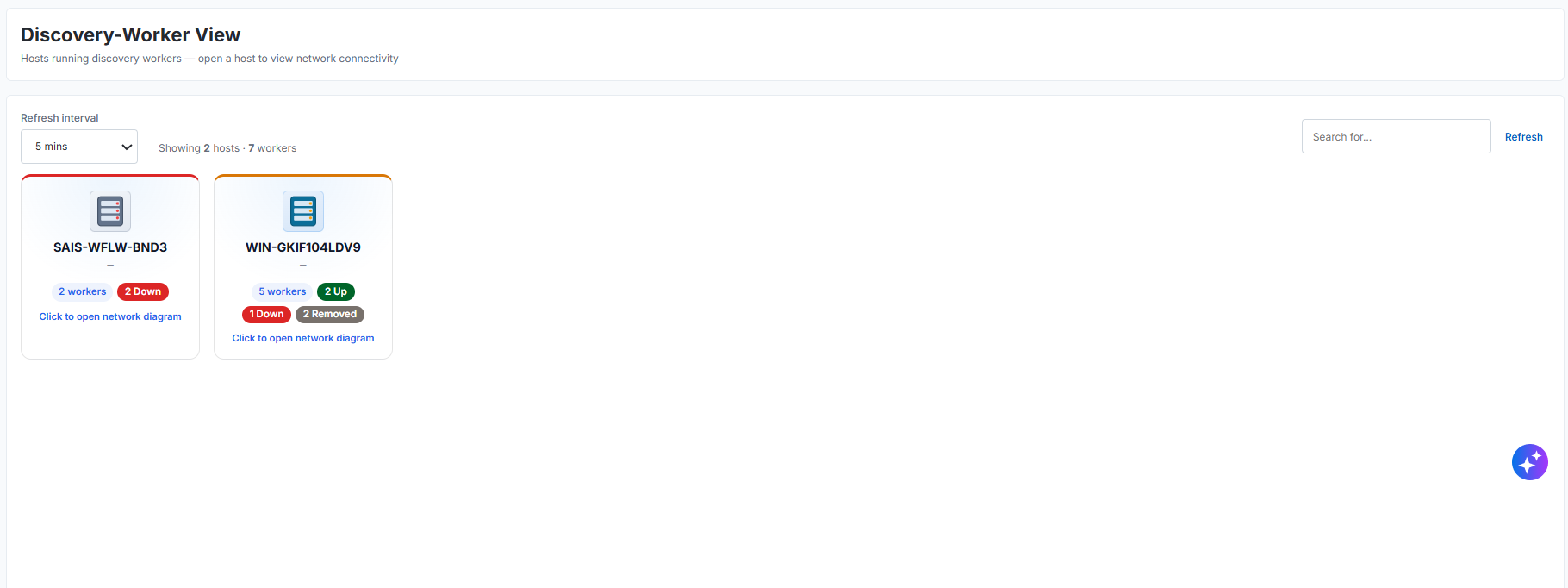
Figure: Discovery Worker host list
For details, see the Discovery Worker.
Discovery Accounts
User Persona: Administrator
The Discovery Accounts experience allows administrators to configure and manage the credentials and connection details required to discover resources across network, cloud, container, API, LDAP, hypervisor, and database environments. These accounts enable the Discovery Worker to connect securely to approved target systems and collect resource information for discovery.
Centralized Account Management
Configure and manage discovery accounts for supported technologies from a centralized location. Each account contains the authentication and connection details required to access its discovery targets.
Secure Access to Discovery Targets
Use configured credentials to allow the Discovery Worker to connect securely to approved environments and collect the information required for discovery.
Technology Coverage
Configure accounts to discover resources across network, cloud, container, API, LDAP, hypervisor, and database environments.
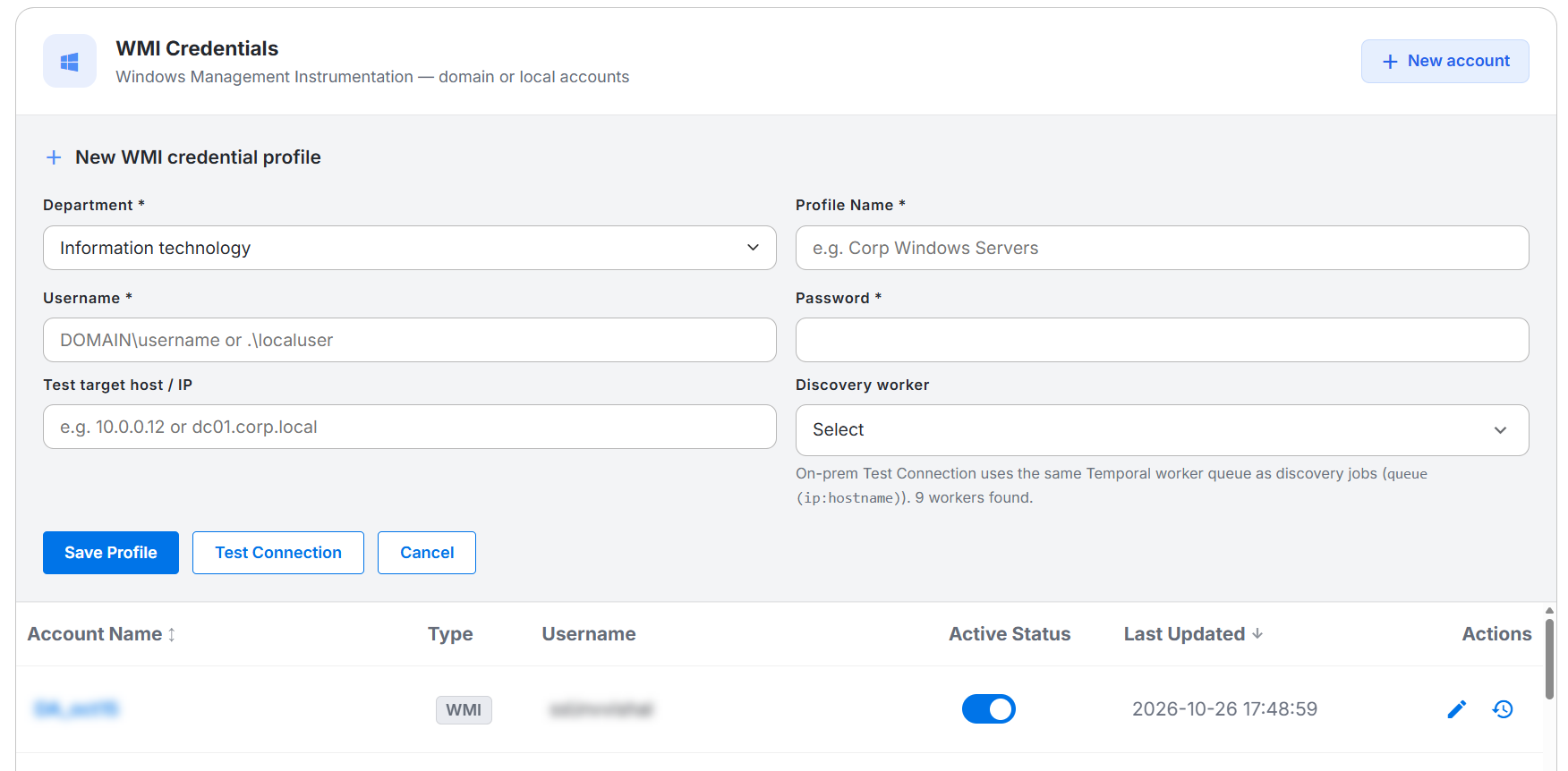
Figure: Discovery Accounts
For details, see Discovery Accounts.
Discovery Intelligence
User Persona: Administrator and Analyst
Discovery Intelligence brings discovery health, activity, and operational risk into a single dashboard so administrators and analysts can monitor the health of the discovery estate without reviewing many reports or job logs. The dashboard combines job outcomes, failed devices, coverage, worker status, credential health, inventory freshness, and discovery trends in one place.
Centralized Discovery Monitoring
Track the health of discovery operations across the organization from a single dashboard. Review fleet health, discovery trends, failed devices, active jobs, and inventory freshness without switching between many views.
Failure Clustering and Root-Cause Focus
Use Failure Intelligence to group failed devices by cause and identify the largest failure categories before drilling into specific jobs or devices. Focus on the most common conditions first to reduce impact faster.
Job and Run Health Visibility
Review run-level indicators such as success rate, fail rate, status distribution, and average duration. Use the job health views to determine whether failures affect a few devices or the wider discovery estate.
Repeat-Failure and Device Investigation
Identify hosts that fail across consecutive runs, flag new failures, and distinguish persistent issues from temporary spikes. Open related jobs and devices to investigate the underlying cause and remediate it quickly.
Operational Coverage and Worker Insights
Monitor discovery coverage, schedule health, inventory freshness, and the status of workers and credentials. These insights help administrators detect configuration drift, stale inventory, missing coverage, or operational issues that can affect discovery outcomes.
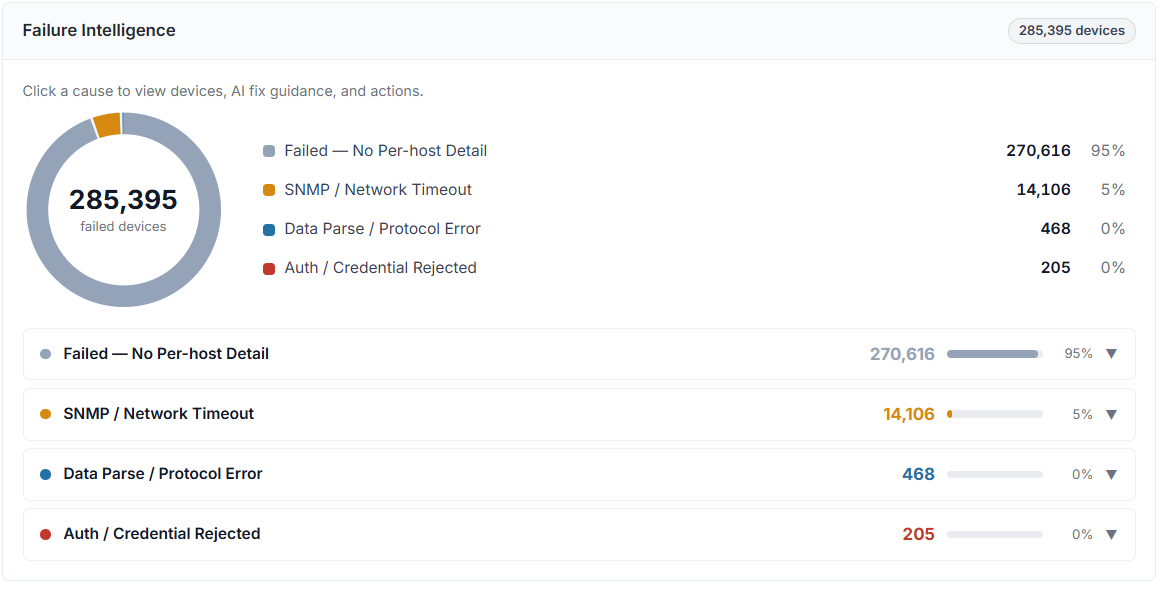
Figure: Discovery Intelligence
For details, see Discovery Intelligence.
Discovery Extensions
User Persona: Administrator
Discovery Extensions let administrators tailor device data collection when standard discovery does not return a needed attribute or value. Create command sets for SSH, WMI, or SNMP, and scope them to a discovered operating system when needed. Enabled commands run during matching discovery scans and can save results as custom attributes or update standard inventory fields.
Protocol-Specific Commands
Configure shell commands for SSH, WQL queries for WMI, or numeric OIDs for SNMP. Use protocol-specific fields to retrieve the values required from target devices.
OS-Targeted Command Sets
Apply commands to selected discovered operating systems with the OS Filter. Keep each protocol and OS combination unique to avoid duplicate command sets running in sequence and overwriting earlier results.
Flexible Inventory Updates
Use New Field to store results as custom attributes, Override to replace standard inventory values, or Fallback to populate standard fields only when default discovery leaves them empty.
Output Parsing
Choose First Line, Last Line, Full Output, Regex, or JSON Path to process command, query, and OID results before Discovery stores them.
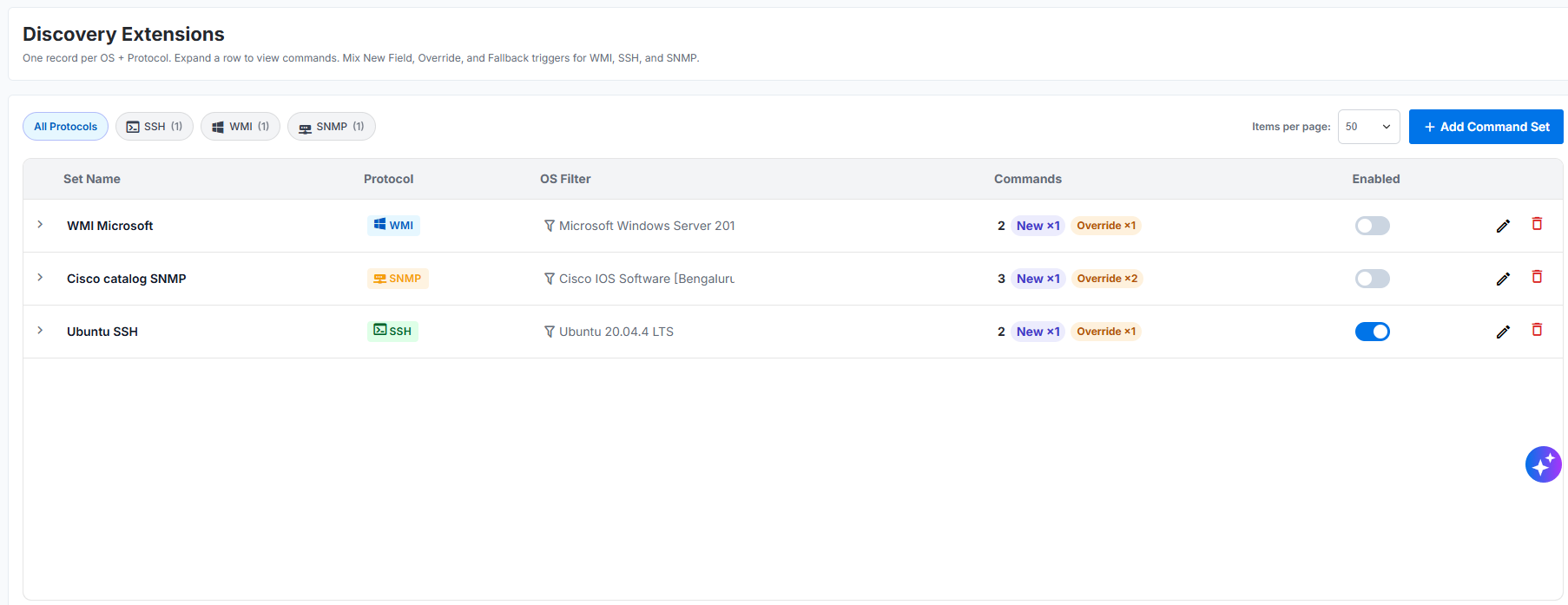
Figure: Discovery Extensions command sets
For details, see Discovery Extensions.
AIW Feature Enhancement
Key Highlight
Knowledge that respects who can access it.
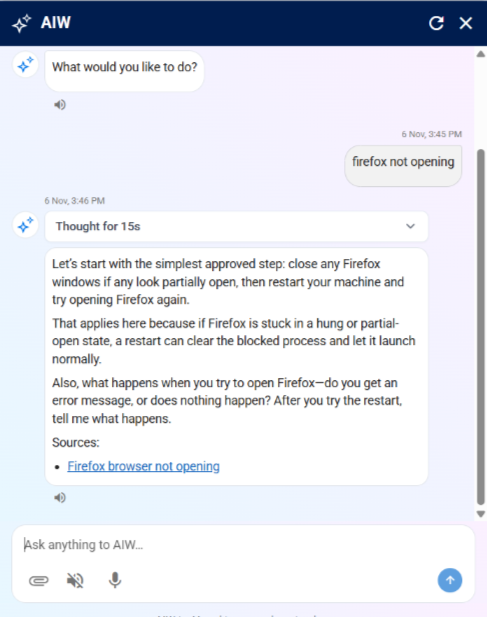
EKM now validates persona-based access permissions before retrieving or recommending Knowledge Articles through AIW. Whether an article is intended exclusively for IT analysts, employees at a specific location, or a designated customer, EKM ensures that the content is surfaced only to authorized users.
This enhancement strengthens knowledge security, prevents unintended exposure of restricted information, and delivers more relevant knowledge suggestions.
Perks at a Glance
Stronger Knowledge Security: Prevents unauthorized users from accessing analyst-only, location-specific, and customer-specific Knowledge Articles.
Controlled Knowledge Visibility: Ensures that articles are surfaced only to users who meet the configured persona-level access restrictions.
Relevant AIW Suggestions: Delivers knowledge recommendations that align with the user's persona, location, and customer association.
Consistent Access Enforcement: Applies access restrictions during knowledge retrieval, helping prevent restricted articles from appearing in AIW responses.
Centralized Knowledge Management: Enables organizations to maintain different categories of enterprise knowledge in a common EKM repository while controlling their visibility.
Screenshot
For more information, refer to Enterprise Knowledge Management Search.
Conversational Change and Purchase Request Approvals
User Persona: Approver
Manage pending approvals directly through AIW conversations.
AIW enables authorized approvers to view, review, approve, or reject pending Change Requests (CRs) and Purchase Requests (PRs) through conversational interactions, without leaving AIW. Access is governed by assigned roles and permissions.
✅ Perks at a glance
View Pending Approvals: Access assigned CR and PR approvals.
Review Requests: View request details before taking action.
Quick Decisions: Approve or reject requests directly within AIW.
Role-Based Access: Ensures approval actions are restricted to authorized users

Figure: AIW
For more information, refer Approver.
Fixed Issues
There are no fixed issues in this release.
Improvements
Following are the improvements in this release.
Improvement Name | Description | Benefits |
|---|---|---|
Role Template User Persona: Administrator | Administrators can now manage user access to individual dashboards through role templates. The Dashboard option is selected by default. By clicking REPORTS, administrators can view the available report modules in the right panel and configure the required access permissions. For more information, refer Role Template. |
|
Known Issues
Following are the known issues in this release:
Bug ID | Description |
129506 | The new dataset is created every time instead of searching and selecting the existing dataset. |
130382 | Workflow Engine : When 2 Branch components are connected sequentially then in Run History popup, the component details are not displayed under the second branch node. |
132130 | AIW > SR > Approve SR > AIW responses experience high latency during approval actions |
134007 | Automation>Apex2.0>>Observability>>VictoriaLogs: Unable to query history records by tenant via VMUI & GET /observability/events: Pagination not supported (offset returns empty) |
134083 | AIW > SR > End User Dashboard > AIW displays duplicate action list when SR card is opened from Approval Tower and AIW lists actions that are not applicable to the selected SR |
134261 | Deallocation Quantity column is displayed empty for grid to Consumables and accessories and Tab pressed with focus on elements not working |
134322 | Approve Service Request: On clicking the Record ID & navigating to the Details page, disabled controls are displayed in an enabled state, & mandatory fields are displayed as non-mandatory on the Approve Request page |
134332 | Incident>>API>>Unable to update the parent ticket via API |